How JTBD frameworks and accessibility audits help product teams move faster, design smarter, and reach markets they did not know they were missing.
There is a version of customer-centric design that most product teams know well. It involves a lot of workshops, a lot of sticky notes, a lot of rounds of feedback from stakeholders who disagree with each other, and a design process that stretches across months without producing a single validated decision. The team calls it being thorough. What it actually is, most of the time, is expensive indecision dressed up as process.
The irony is that the teams spending the most time on design iterations are often the furthest from understanding what their users genuinely need. More rounds of visual polish do not close a product-market fit gap. More stakeholder reviews do not surface the friction points that send users quietly away. What closes those gaps is the right research method applied at the right moment, and two of the most underused tools in product development are the Jobs To Be Done framework and structured accessibility audits.
Used together, these approaches do something remarkable for resource-constrained teams: they compress the number of design iterations required to reach a good decision, and they expand the addressable market at the same time. This is not a theoretical claim. It is the practical outcome of designing around what users are actually trying to accomplish rather than what they say they like.
Key Takeaways
- Customer-centric design fails not from too few iterations, but from iterating on the wrong questions.
- The JTBD framework reframes design around outcomes users want, not features teams assume they need.
- Accessibility audits are not a compliance checkbox — they are a market expansion strategy with measurable ROI.
- Inclusive design principles applied early eliminate the most expensive retrofit: accessibility added after launch.
- Combining JTBD interviews with accessibility audits produces a design brief that is both more focused and more broadly applicable.
- The iterative design process becomes faster, not slower, when the research foundation is stronger.
1. Why Customer-Centric Design Gets Stuck in Iteration Loops
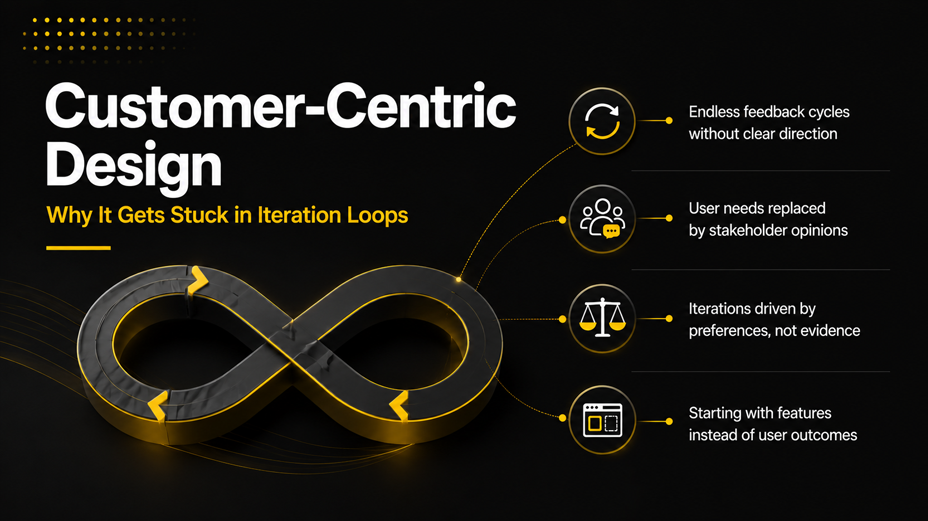
The promise of customer-centric design is that the user is at the centre of every decision. In practice, what ends up at the centre of most design processes is the opinion of whoever has the most influence in the room. The user’s actual behaviour gets filtered through survey responses, usability sessions conducted on prototypes that bear little resemblance to real conditions, and stakeholder feedback that reflects business preferences more than user needs.
The result is an iterative design process that runs in circles. Each round of feedback introduces new preferences. Each new preference generates a new design direction. Each new direction requires another round of feedback. The cycle continues until a deadline forces a decision or the budget runs out, whichever comes first.
This is not a problem with design thinking in general. It is a problem with how user research methods are applied at the start of the process. When the design brief is built on assumptions rather than evidence, every subsequent iteration is trying to correct a foundation that was never solid. The iterations multiply because of the core question, i.e., what job is this product actually being hired to do? was never asked with the rigour it requires.
The Three Root Causes of Iteration Overload
- Starting with features rather than outcomes — Most design briefs describe what the product will do, not what the user is trying to accomplish. This leads to rounds of feedback on the wrong level of detail.
- Treating stakeholder feedback as user research — Stakeholders know the business. They do not know what users struggle with at 11pm on a mobile device with two battery bars left. Conflating these two sources produces design decisions that satisfy neither.
- Separating accessibility from the core design process — When inclusive design principles are treated as a final checklist rather than a foundational constraint, they generate an additional round of retrofitting that is both expensive and usually incomplete.
The fix: Build the design brief from job interviews, not assumption workshops. The JTBD framework is the most direct route from ‘what should we build?’ to ‘here is the evidence for what we should build.’
2. The JTBD Framework: Designing for What Users Are Actually Trying to Do
The Jobs To Be Done framework, developed by Clayton Christensen and refined by practitioners including Bob Moesta, is built on a single foundational insight: people do not buy products; they hire them to do a job. That job has functional dimensions (what needs to get done), emotional dimensions (how the user wants to feel while doing it), and social dimensions (how they want to be perceived).
For product teams, the JTBD framework changes the starting point of customer-centric design from ‘what features should this have? ‘What is the user struggling to accomplish, and what would a successful outcome feel like to them? ‘That shift, applied consistently, produces a design brief that is both more specific and more durable than anything generated from a persona-led process.
| Dimension | Traditional Persona-Led Design | JTBD Framework |
| Starting point | Who is the user? | What job is the user trying to get done? |
| Design trigger | User demographic or segment | Circumstance + desired outcome |
| Failure mode | Builds for assumed needs | Uncovers needs users cannot articulate |
| Iteration driver | Stakeholder opinion & visual polish | Evidence from job interviews |
| Market view | Defined by existing users | Expands to all who share the job |
| Accessibility fit | Often added at the end | Embedded — the job is universal |
Running JTBD Interviews That Produce Usable Design Briefs
A JTBD interview is not a usability session, and it is not a focus group. It is a structured conversation designed to reconstruct the story of a specific decision, specifically, the moment a user switched from their previous solution to yours or the moment they considered switching and did not. The narrative that emerges from that reconstruction contains more useful design information than any number of survey responses.
The interview structure that produces the most usable output follows a timeline:
- The first thought — When did the user first realise they had this problem? What triggered the awareness?
- The search — What did they look for? What alternatives did they consider? What made those alternatives inadequate?
- The decision — What caused them to choose this solution? What were they hoping would be different?
- The result — What happened? Where does friction still exist? What do they wish the product did that it currently does not?
The design insight comes from the gaps in this narrative. When users consistently describe the same moment of friction, the same unanswered question, or the same workaround, that pattern is the brief. It is more reliable than any stakeholder feedback session because it is grounded in what people actually did rather than what they think they would do.
How JTBD Reduces Design Iterations
The JTBD framework compresses the iterative design process because it answers the question that most iteration is trying to reach: are we solving the right problem? When that question is answered in the research phase rather than the design phase, the iterations that follow are refinements of execution rather than corrections of direction. That is a fundamentally different and faster kind of iteration.
Product development frameworks built around JTBD consistently report fewer rounds of major design revision because the design brief specifies outcomes, not features. Outcomes are stable. Features are negotiable. When everyone in the room is aligned on the outcome, the conversation about which feature best achieves it is shorter and less contentious.
3. Accessibility Audits: The Market Expansion Strategy Most Teams Overlook
Accessibility audits are one of the most misunderstood tools in product development. Most teams treat them as a compliance exercise, something to commission before a public sector tender or in response to a legal risk flag. The teams that treat them as a market expansion strategy find something different: a structured methodology for identifying user experience design failures that affect a far larger segment than the one typically labelled ‘disabled users’.
The numbers make the case plainly. According to the World Health Organisation, approximately 1.3 billion people globally live with some form of disability. In the UK alone, that represents around 16 million people: roughly 24% of the population. The spending power of disabled people and their households in the UK, sometimes referred to as the Purple Pound, is estimated at over £274 billion annually. These are not niche users. They are a substantial and persistently underserved market.
Beyond the directly disabled population, accessibility improvements serve users in situational contexts: someone using a mobile in bright sunlight needs high colour contrast for the same reason a low-vision user does. Someone holding a sleeping baby and navigating one-handed needs large touch targets for the same reason a user with limited motor control does. Inclusive design principles, applied correctly, do not narrow the product; they expand it.
What a Structured Accessibility Audit Covers
| Audit Area | What to Check | Market Expansion Impact |
| Colour contrast | WCAG AA: 4.5:1 for normal text | Serves low-vision users + outdoor mobile |
| Keyboard navigation | All interactions reachable without a mouse. | Motor-impaired users + power users |
| Screen reader support | ARIA labels, semantic HTML, focus order | Blind/visually impaired users globally |
| Captions & transcripts | All video and audio content | Deaf users + non-native speakers |
| Touch target sizing | Minimum 44×44px per WCAG 2.5.5 | Older adults + motor difficulties |
| Plain language | Reading age ≤ Grade 8 for core flows | Cognitive differences + lower literacy |
The Business Case for Accessibility Audits in Market Expansion Strategies
The return on investment from accessibility audits is not abstract. When Microsoft conducted inclusive design research into one-handed mobile use, the resulting design improvements benefited not just users with permanent motor disabilities but also the far larger population of users with temporary or situational constraints. The market expansion impact of that work extended well beyond the accessibility use case it started with.
For product teams, the practical implication is this: an accessibility audit is not just a compliance check. It is a user research method that surfaces friction experienced by the broadest possible population of users. The fixes it recommends improve the experience for everyone. The market it opens is larger than most teams realise, and it does so without requiring additional design iterations. The audit replaces a round of iteration with a round of structured evidence.
Key insight: Every accessibility failure in your product is also a usability failure for a larger group of users who will never identify themselves as disabled. Fixing one fixes both.
4. Combining JTBD and Accessibility: A Design Brief That Works Twice as Hard
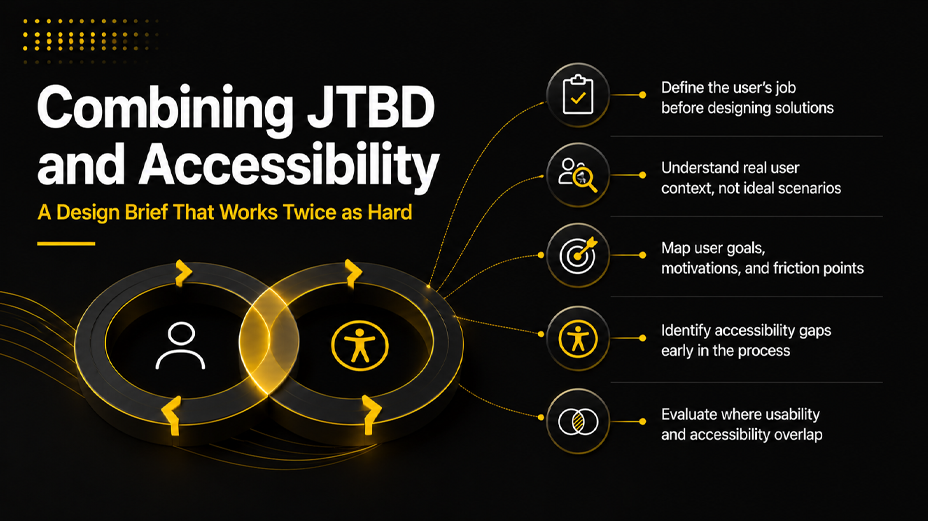
The most effective application of these two frameworks is sequential, not parallel. JTBD interviews establish what job the product needs to do and for whom. Accessibility audits establish the full range of contexts in which users will attempt to do that job. Together, they produce a design brief that is simultaneously more focused on the core outcome and more inclusive of the conditions under which users will actually encounter the product.
The Combined Research Process
- Conduct JTBD interviews with 15–25 users across your target segment. Map the job statement: the situation, the motivation, and the expected outcome. Identify the moments of friction that prevent the job from getting done.
- Run a WCAG 2.1 AA accessibility audit against your current product or prototype. Document failures by category and severity. Note which failures would block the core job identified in the JTBD research.
- Cross-reference the two outputs. Where a JTBD friction point and an accessibility failure overlap – a confusing navigation pattern that also fails keyboard navigation standards, for example – you have a high-priority design fix that improves the experience for the broadest possible population.
- Build the design brief around job outcomes and inclusive design principles simultaneously. Not ‘here is the design, and here is the accessibility version’. One design that does both.
This approach eliminates the most expensive version of design iterations: the retrofit. Accessibility added after a design is finalised requires undoing decisions, renegotiating visual hierarchies, and rebuilding interactions that were not built with inclusive design principles from the start. The cost of retrofitting is consistently estimated at five to ten times the cost of building accessibly from the beginning.
How Stakeholder Feedback Fits In
Stakeholder feedback remains part of the process; it simply occupies a different position. In a JTBD-led, accessibility-informed design process, stakeholder feedback sessions review execution against a pre-agreed brief rather than generating the brief. The question changes from ‘what do you think of this design?’ to ‘Does this design achieve the job we agreed to solve for the full range of users we agreed to serve?’
That is a question with a verifiable answer. Stakeholder feedback given against a clear brief generates fewer revision cycles because the criteria for a good decision are already established. Design thinking applied in this sequence – research first, brief second, execution third, and review fourth – produces better outcomes in fewer rounds than the reverse.
5. Building an Iterative Design Process That Learns Rather Than Loops
The goal is not to eliminate design iterations. Iteration is how good design gets made. The goal is to ensure that each iteration is answering a question rather than generating new ones. That distinction between iterating with evidence and iterating with opinion is what separates the design processes that converge on strong solutions from the ones that run indefinitely.
A Four-Stage Process That Converges
- Evidence stage — JTBD interviews, accessibility audit, and any existing analytics reviewed together. Output: a design brief with defined job outcomes and inclusive design constraints. This stage replaces assumption workshops and early stakeholder reviews.
- Direction stage — One to three design directions developed and tested against the brief criteria. Not visual options for stakeholders to pick between, but structural approaches to solving the defined job. User research methods applied at this stage: short moderated sessions with five users per direction.
- Refinement stage — The selected direction is refined through the iterative design process with a fixed number of rounds, typically two to three, each tied to a specific question. ‘Does this navigation pattern allow keyboard users to complete the core job? ‘Is a question with an answer. ‘What do you think?’ is not.
- Validation stage — A structured test with users across the full range of contexts identified in the accessibility audit. Not just the primary persona, but users in situational constraints, users with assistive technology, and users on lower-specification devices. The pass criteria are the job outcomes from stage one.
This process is not faster because it skips steps. It is faster because every step produces an output that informs the next one, rather than reopening questions that were already answered.
The Role of Data-Driven Decision Making
At each stage, the decision about whether to proceed or revise is data-driven rather than opinion-driven. Data-driven decision-making in this context does not mean large quantitative samples. It means that the criteria for a good decision are established before the decision is made, and the evidence is evaluated against those criteria rather than against the shifting preferences of the people in the room.
For customer-centric design to actually remain centred on customers, the customer’s voice captured in JTBD interviews, measured in accessibility audit failures, and tracked in post-launch adoption data needs to be the loudest voice in every design review. Not the loudest stakeholder. Not the most senior designer. The user’s demonstrated behaviour.
Final Thoughts
Customer-centric design does not require infinite design iterations. It requires better questions asked earlier in the process, and two of the most powerful tools for asking them are the JTBD framework and structured accessibility audits.
The JTBD framework gives design teams a method for understanding what users are actually trying to accomplish, not what they say they want or what stakeholders assume they need. Accessibility audits give teams a structured view of the full range of contexts in which users will attempt to use the product and a direct path to the market segments that most products quietly exclude.
Used together, they produce something that most design thinking processes struggle to deliver: a brief that is specific enough to make decisions with, broad enough to serve a genuinely large market, and evidence-based enough to survive stakeholder review without generating a new round of revisions.
The inclusive design principles that emerge from this combination are not constraints on creativity. They are the conditions that make user experience design genuinely serve the users it claims to be centred on. And when that alignment is real rather than aspirational, the iterations become refinements rather than redirections, which is exactly how good products get made.
If your team is working through a design process and would find a structured conversation about JTBD or accessibility audit methodology useful, we are at coffee@sparkeighteen.com