A hospital in Germany flags a patient fall 0.3 seconds after it happens. A car manufacturer in Stuttgart catches a hairline weld defect on frame 4,712 of a 9-hour production run. A retail chain in Singapore detects a planogram violation across 140 stores before the morning shift begins. None of these outcomes required a human watching a screen. They required an AI video agent: a system that sees, understands, reasons, and acts without waiting to be asked.
The AI video analytics market was valued at $20.75 billion in 2025 and is projected to reach $86.21 billion by 2030, growing at a compound annual growth rate (CAGR) of 32.9%. That trajectory is not driven by incremental improvements to legacy camera software. It is driven by a fundamental shift: organisations are replacing passive video infrastructure with agents that process, reason about, and respond to visual data in real time.
This guide covers everything you need to make an informed decision about AI video agent development: how the architecture works, what it costs to build, which tools the industry relies on, and where enterprises are deploying these systems today.
Key takeaways
- An AI video agent is a layered system that ingests raw video, applies computer vision perception, adds multimodal AI reasoning, and triggers real-world actions autonomously.
- The core AI video pipeline architecture follows a 5-layer model: ingestion, perception, understanding, reasoning, and action.
- Enterprise AI video agents are deployed across manufacturing, healthcare, retail, logistics, security, and media, with measurable business outcomes at each.
- The cost to build AI video agents ranges from $50,000 for a basic proof of concept (POC) to over $940,000 for an enterprise-grade, multi-site deployment.
- Compliance (GDPR, HIPAA, EU AI Act) must be designed in from day one, not bolted on at the end.
- The most capable multimodal AI video agents pair vision models (YOLO, SAM, GPT-4V) with LLM orchestration frameworks (LangChain, AutoGen) to move from detection to decision.
What is an AI video agent?
An AI video agent is an autonomous software system that ingests video data, processes it through layered perception and reasoning models, and executes responses or decisions without human intervention. Unlike traditional video analytics tools that apply fixed rules (“alert if a person enters zone B”), an AI video agent interprets the scene, applies business context, and decides what to do next.
The distinction matters in practice. A rule-based system flags every person who enters a restricted area. An AI video agent identifies that the person is wearing the correct badge, moving toward the fire exit rather than toward equipment, and marks the event as resolved before an operator even sees it. The agent does not just detect; it understands.
This is made possible by the convergence of 3 technologies: high-accuracy computer vision models for perception, large vision-language models (VLMs) for scene understanding, and agentic orchestration frameworks that manage reasoning, memory, and tool use. When these layers work together, a camera feed becomes a decision-making interface.
AI video pipeline architecture: the 5-layer model
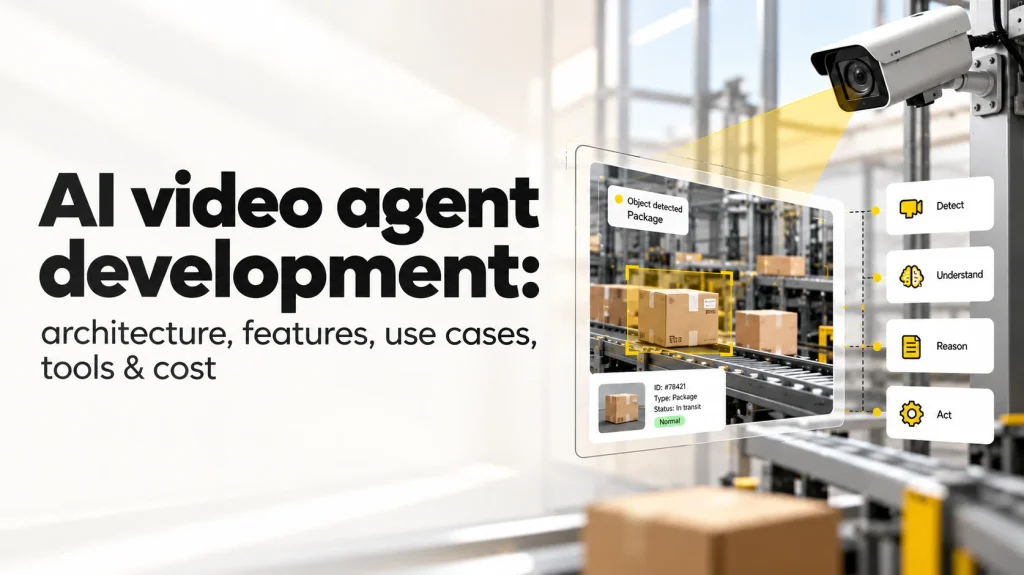
The AI video pipeline architecture that powers production-grade AI video agents follows a consistent 5-layer structure. Each layer handles a specific responsibility, and the layers communicate through defined interfaces that allow components to be upgraded or replaced without rebuilding the whole system.
| Architecture layer | Responsibility | Key technologies |
| Ingestion layer | Captures and preprocesses video from cameras, streams, and stored files | RTSP, GStreamer, FFmpeg, WebRTC |
| Perception layer | Detects objects, faces, actions, and scenes using computer vision models | YOLO, SAM, DINO, OpenCV, MediaPipe |
| Understanding layer | Contextualises visual data using multimodal AI and vision-language models | GPT-4V, Gemini Pro Vision, LLaVA, CogVLM |
| Reasoning layer | Applies business logic, triggers workflows, and makes autonomous decisions | LangChain, AutoGen, CrewAI, custom orchestrators |
| Action layer | Executes responses: alerts, reports, API calls, and robotic commands | REST APIs, Kafka, MQTT, webhook integrations |
The real architectural breakthrough in modern video agents architecture is what happens between the perception and reasoning layers. Traditional computer vision stops at the perception layer: it detects a person, a vehicle, or an anomaly and hands that label to a downstream system. A modern multimodal AI video agent extends the pipeline: the VLM at the understanding layer reads the scene the way a knowledgeable person would, and the reasoning layer applies business rules, retrieval-augmented generation (RAG) pipelines, and tool-calling capabilities to decide what the appropriate response is.
Consider a manufacturing floor deployment. The perception layer detects that a machine component is misaligned. The understanding layer reads the visual context and recognises the specific part and its deviation from tolerance. The reasoning layer queries a knowledge base of historical defect patterns, identifies that this deviation is a known precursor to weld failure, and generates an incident report with the recommended corrective action. The action layer fires that report directly into the ERP system and pages the relevant engineer. No human watched the feed. The whole sequence took under 2 seconds.
This is the architecture that separates a production-grade video agents architecture from a technology demo.
Use cases of AI video agents across industries
Enterprise AI video agents are deployed wherever visual monitoring at human scale is operationally impossible. The table below captures the highest-impact deployments across industries and the business outcomes organisations are seeing.
| Industry | Use case | Business impact |
| Manufacturing | Automated visual quality inspection on assembly lines | Up to 90% reduction in defect escape rate |
| Healthcare | Real-time surgical assist and remote patient monitoring via video | Faster triage, clinician workload reduced by 30%+ |
| Retail | In-store customer behaviour analysis and shelf compliance checks | 15-25% uplift in planogram adherence |
| Logistics | Warehouse operations monitoring and forklift safety compliance | 40% reduction in workplace incidents |
| Security | Anomaly detection in live CCTV feeds with automated alerting | Real-time threat identification, false alarms reduced by 60% |
| Media and content | Automated content moderation, tagging, and compliance screening | 10x faster review cycles versus manual moderation |
| Agriculture | Drone-based crop health monitoring and pest detection | 20-30% improvement in early intervention rates |
| Construction | Worksite safety monitoring (PPE detection, zone violations) | Proactive compliance enforcement, reduced OSHA incidents |
The breadth of enterprise AI video agents deployment reflects a broader shift. Gartner projects that 40% of generative AI solutions will be multimodal by 2027, up from just 1% in 2023. Video is the most data-dense modality available, and organisations that deploy agents across it gain a class of operational intelligence that no dashboard or manual process can replicate.
Key features of AI video agent development
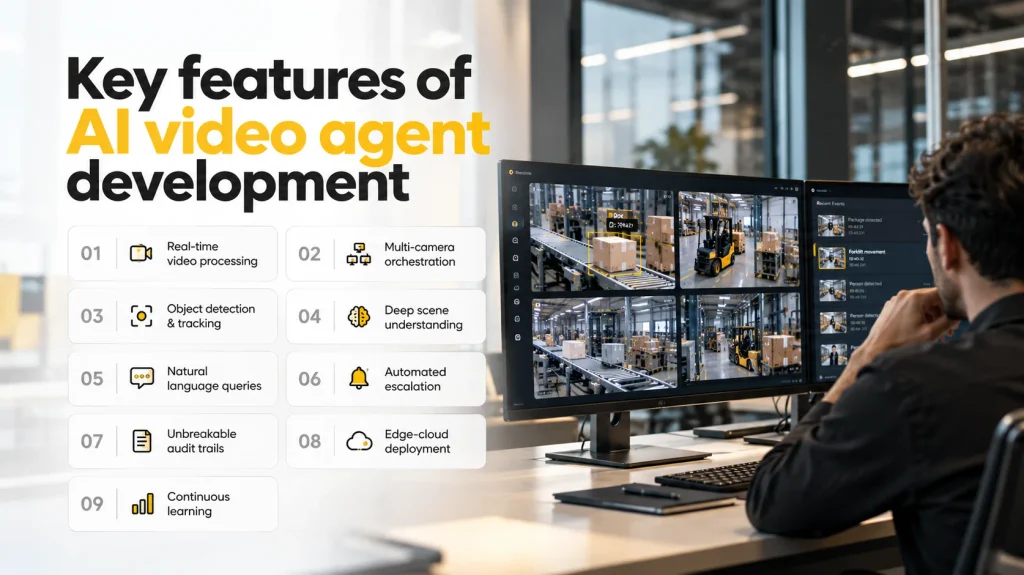
Understanding the key features of AI video agent development separates a well-scoped project from one that fails in production. The capabilities listed here are not optional enhancements; they are the minimum bar for a system that delivers reliable business value.
Real-time video stream processing. Latency above 1 second is operationally disqualifying in most enterprise contexts. A security agent that detects a threat 4 seconds after it occurs cannot trigger a meaningful response. The ingestion and perception layers must be engineered for sub-second inference, which requires GPU-accelerated hardware, optimised model formats (TensorRT, ONNX), and efficient frame sampling strategies.
Multi-camera orchestration. Single-camera deployments are POCs. Real enterprise AI video agents manage dozens to thousands of concurrent streams across distributed sites. The orchestration layer must allocate compute dynamically across streams, prioritise high-activity feeds, and maintain system stability under variable load, without dropping frames or introducing processing queues that delay critical alerts.
Object detection, tracking, and classification. The perception engine connects models such as YOLOv8 or DINO to identify objects, lock onto targets across frames, and classify them by category, behaviour, and risk level. DeepSORT or similar tracking algorithms maintain identity continuity across occlusion and camera transitions, which is essential for behavioural analysis over time.
Deep scene understanding. Identifying a vehicle is the easy part. Understanding that the vehicle is the wrong type, in the wrong zone, at a time when no deliveries are authorised, and correlating that with an access control event from 3 minutes ago requires scene understanding that only multimodal AI video agents with vision models can provide. This is where VLMs earn their place in the stack.
Natural language query interface. Operators should not need specialist training to interrogate the system. A natural language interface that allows queries like “show me every instance of gate tailgating since last Tuesday” reduces the skill requirement for operators and dramatically increases the speed of incident investigation.
Automated escalation workflows. Detection without action is monitoring software, not an agent. The action layer must connect directly to alerting channels (Slack, SMS, PagerDuty), incident management systems (ServiceNow, Jira), and operational platforms (ERP, SCADA) with configurable rules that operations teams can modify without engineering support.
Unbreakable audit trails. Every decision the agent makes must be logged with timestamped visual evidence and a reasoning trace. This is non-negotiable in healthcare, finance, and any regulated environment. Audit trails also serve as the primary input for model retraining: the events where the agent was wrong, overridden, or uncertain are the ones that improve future performance.
Edge-cloud hybrid deployment. Sending raw video to the cloud for inference is bandwidth-prohibitive at scale. A production deployment runs latency-sensitive inference at the edge (on hardware such as NVIDIA Jetson Orin) and transmits only structured events and relevant clips to the cloud for storage and deeper analytics. This architecture reduces bandwidth costs by 60-80% compared to cloud-only approaches.
Continuous learning and drift monitoring. A model trained on summer lighting conditions will degrade in winter. Environmental changes, new object categories, and distributional shifts in real-world data cause model accuracy to drift over time. Production AI video agent development must include automated drift detection with performance thresholds that trigger retraining before accuracy falls below operational requirements.
Tools for AI video agent development
The tooling landscape for AI video agent development has matured significantly. Choosing the right tools at each layer of the stack determines how quickly you can reach production and how easily you can maintain and extend the system.
Vision and perception
OpenCV remains the standard workhorse for image and video preprocessing, feature extraction, and classical vision tasks. It integrates cleanly with deep learning frameworks and is well-suited for the ingestion and early perception layers.
Ultralytics YOLOv8/v9 provides state-of-the-art real-time object detection and segmentation. It is the most widely deployed detection model in production video analytics systems because of its balance of speed and accuracy.
Meta SAM 2 (Segment Anything Model) enables zero-shot segmentation in video, which is particularly useful when you need to segment objects that were not represented in your training data.
Google MediaPipe offers lightweight on-device solutions for pose estimation, face tracking, and hand landmark detection. It is well-suited for edge deployments where compute is constrained.
LLM and multimodal reasoning
OpenAI GPT-4V / GPT-4o provides the strongest off-the-shelf multimodal reasoning capability for video agents that need to interpret complex scenes and answer natural language queries about visual content.
Google Gemini Pro Vision is a strong alternative with native video understanding capabilities and deep integration with Google Cloud infrastructure.
LLaVA and CogVLM are open-source vision-language models suited to on-premise deployments where data cannot leave the organisation’s infrastructure.
LangChain and LlamaIndex are the dominant orchestration frameworks for chaining retrieval, reasoning, and tool use. They provide the scaffolding that turns a vision model’s output into an autonomous decision.
Infrastructure and deployment
NVIDIA Triton Inference Server enables production-grade model serving with support for multiple model frameworks and dynamic batching. NVIDIA Jetson Orin / AGX provides the edge inference hardware required for real-time processing at the source.
Apache Kafka handles high-throughput event streaming from the video pipeline to downstream systems. Docker and Kubernetes provide containerisation and orchestration for scalable, resilient deployments. AWS SageMaker, Azure ML, and GCP Vertex AI are the leading cloud-native MLOps platforms for model training, versioning, and serving.
Annotation and data labelling
CVAT, Label Studio, and Roboflow are the primary tools for video data annotation. The quality of your annotation pipeline directly determines model accuracy, and no amount of architecture sophistication compensates for poor training data.
How to build AI video agents: a step-by-step guide
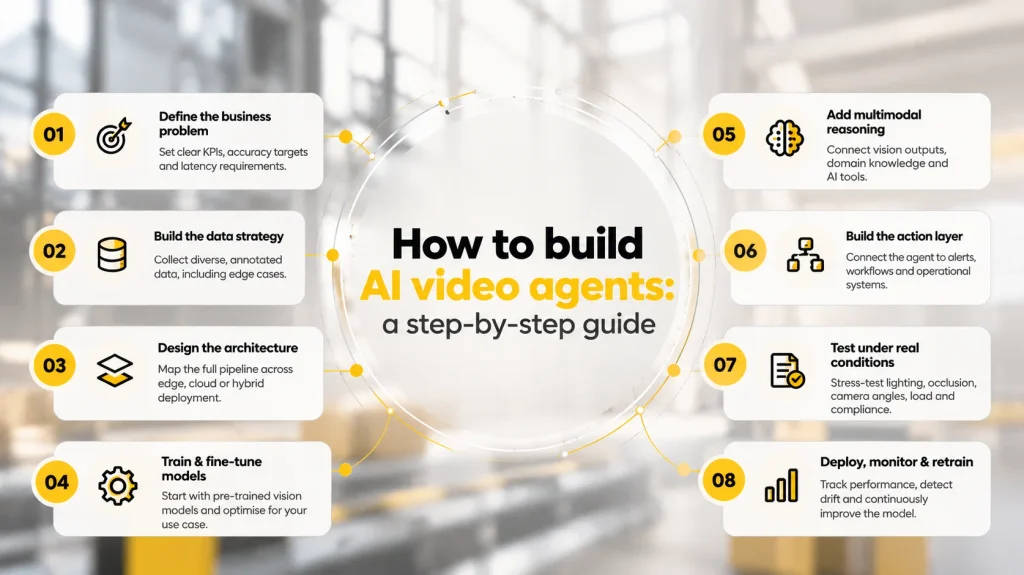
This section is for teams committed to production, not experimentation, whether you’re building in-house or engaging an IT software company to lead the build.If you are wondering how to build AI video agents that survive real operating conditions, this is the process.
Step 1: Define the business problem precisely. Do not start with the technology. Start with the operational failure you are trying to eliminate. Is it defect escape rate, safety non-compliance, shelf out-of-stock, or identity verification at access control points? Write down the KPIs, the acceptable false positive and false negative rates, and the latency requirement. If you cannot define what “working” looks like in measurable terms, the project will fail regardless of the technology choices.
Step 2: Build the data strategy before you touch a model. Video data is expensive to collect, store, and label. Define your annotation requirements before you start collecting footage. Capture the edge cases, the unusual lighting conditions, and the rare event types that matter most to your use case. Shortcuts at the data stage create accuracy problems that no amount of model tuning can fix.
Step 3: Design the AI video pipeline architecture for your deployment constraints. If sub-second latency is a requirement, you need edge inference hardware. If you are processing retrospective footage for compliance, a cloud-native pipeline may be sufficient. Map out every layer (ingestion through action) before writing any code. The architectural decisions made at this stage are expensive to reverse.
Step 4: Train and fine-tune the vision models. Start with pre-trained models (YOLO, DINO, SAM) and fine-tune them against your annotated dataset. Expect 3 to 5 training iterations before you reach acceptable accuracy. Budget for this: each iteration requires annotation review, retraining compute, and evaluation against held-out test sets.
Step 5: Wire up the multimodal AI reasoning layer. This step transforms a perception system into an AI video agent. Connect your vision model outputs to an LLM orchestration framework (LangChain, AutoGen). Add RAG pipelines that give the agent access to your domain knowledge bases, historical data, and operational context. Define the tools the agent can call: alerting APIs, ERP endpoints, incident management systems.
Step 6: Build the action layer with configurable workflows. Connect the reasoning output to the systems that need to act on it. Keep the workflow configuration accessible to operations teams, not just engineers. When business rules change, the team responsible for the outcome should be able to adjust escalation logic without raising a development ticket.
Step 7: Break it before you deploy it. Test adversarially. Throw unexpected lighting conditions, occlusion scenarios, camera angle changes, and high-load conditions at the system before it touches production. Validate that it meets the KPIs defined in step 1. If it processes personally identifiable information (PII), complete a data protection impact assessment (DPIA) before go-live.
Step 8: Deploy, monitor, and close the retraining loop. Launch with comprehensive monitoring across latency, accuracy, and model drift. Funnel production failures back into your annotation pipeline. The retraining loop is not a post-launch task; it is a permanent operational function. A deployed model that is not continuously updated will degrade.
Cost to build AI video agents
The cost to build AI video agents varies significantly based on scope, complexity, and deployment model. The table below reflects realistic ranges based on industry benchmarks.
| Cost component | Basic agent | Mid-complexity agent | Enterprise-grade agent |
| Discovery and strategy | $5,000-$15,000 | $15,000-$30,000 | $30,000-$60,000 |
| Data collection and annotation | $10,000-$25,000 | $25,000-$75,000 | $75,000-$200,000 |
| CV model development | $15,000-$40,000 | $40,000-$100,000 | $100,000-$250,000 |
| LLM and multimodal integration | $5,000-$15,000 | $20,000-$60,000 | $60,000-$150,000 |
| Infrastructure and DevOps | $5,000-$10,000 | $15,000-$40,000 | $40,000-$100,000 |
| Testing and QA | $5,000-$10,000 | $10,000-$30,000 | $30,000-$80,000 |
| Deployment and integration | $5,000-$10,000 | $15,000-$40,000 | $40,000-$100,000 |
| Total estimate | $50,000-$125,000 | $140,000-$375,000 | $375,000-$940,000+ |
The AI video agent development cost is shaped by 5 variables more than any others. The number of concurrent video streams directly affects compute requirements and infrastructure cost. Real-time processing mandates GPU-accelerated edge hardware, adding $15,000-$50,000 per site compared to batch-processing architectures. Custom model training delivers higher accuracy than pre-trained fine-tuning but requires significantly more annotated data and training compute. Compliance engineering for HIPAA, SOC 2, or FedRAMP deployments adds 15-25% to the base development cost. And integration with legacy ERP, SCADA, or proprietary systems typically accounts for 20-30% of the total custom AI video agent development cost in enterprise deployments.
The custom AI video agent development cost for enterprise contracts also typically includes SLA-backed support, dedicated model retraining schedules, and managed infrastructure, adding 15-25% to the base figure annually.
The ROI case for enterprise AI video agents is consistent across industries. Reduced labour (replacing manual monitoring roles), faster incident response (reducing mean time to resolve from hours to seconds), and compliance automation (eliminating penalty risk) typically deliver full payback within 6 to 12 months of go-live.
Compliance considerations for AI video agent development
Deploying AI systems that process video data triggers a range of regulatory obligations. The compliance requirements are not peripheral; in regulated industries, they are design constraints that shape the architecture from the ground up.
| Regulation | Scope | Impact on video agents |
| GDPR (EU) | Personal data protection, right to erasure, consent management | Facial recognition and biometric processing require explicit consent and data minimisation |
| CCPA/CPRA (California) | Consumer privacy rights, data sale restrictions | Video data containing identifiable individuals triggers consumer rights obligations |
| HIPAA (US Healthcare) | Protected health information security | Video agents in clinical settings must encrypt data and maintain audit trails |
| EU AI Act | Risk-based AI regulation, high-risk system requirements | Real-time biometric identification in public spaces classified as high-risk |
| SOC 2 Type II | Security, availability, processing integrity | Required for SaaS-based video analytics platforms serving enterprise clients |
| BIPA (Illinois) | Biometric data collection and storage | Strict consent and retention requirements for facial recognition systems |
The practical implication is this: if your deployment involves facial recognition, biometric data, or video captured in clinical settings, your architecture must include on-device anonymisation (face blurring before cloud transmission), encrypted storage with field-level access controls, immutable audit logs with retention policies that meet the applicable regulatory framework, and a consent management layer if data subjects have opt-out rights. Compliance is not a checklist you complete before launch; it is a set of architectural properties you build in from the start.
Common challenges and how to solve them
| Challenge | Root cause | Solution |
| High latency in real-time processing | Unoptimised models, cloud-only architecture | Edge-cloud hybrid with TensorRT optimisation; sub-100ms inference at the edge |
| Model accuracy degradation over time | Data drift, environmental changes | Automated drift detection with scheduled retraining pipelines |
| Massive storage and bandwidth costs | Storing raw video 24/7 | Event-driven recording, intelligent frame sampling, video compression |
| Privacy and consent management | Facial recognition on public feeds | On-device anonymisation before cloud transmission |
| Integration with legacy systems | Proprietary protocols, limited APIs | Middleware adapters and protocol translators for SCADA, ONVIF, and ERP systems |
| Scaling across distributed sites | Inconsistent network conditions | Containerised edge agents with offline capability and sync-on-connect |
| High false positive rates | Insufficient training data diversity | Active learning pipelines that surface hard negatives for targeted retraining |
What building multimodal reasoning systems teaches you about video agents
The technical foundations of a custom AI video agent, specifically the combination of perception, multimodal AI reasoning, and structured knowledge retrieval, apply directly to the challenges Spark Eighteen, an IT software company specialising in AI engineering services, encountered while building the ConnectHEOR platform. ConnectHEOR is a health economics AI platform built for a London-based life sciences client. The core problem was similar to what a video agent faces: take noisy, unstructured input (in ConnectHEOR’s case, health economic model data rather than visual frames), apply multiple reasoning techniques to extract reliable structured output, and do so in a way that can be audited and trusted by expert users.
The team implemented 6+ advanced reasoning techniques using LangChain and LangGraph, combined with Neo4j GraphRAG and Graph of Thought to reduce hallucinations and ground outputs in structured domain knowledge. The insight that transferred directly to video agent work: the reliability of a multimodal AI system is determined not by the capability of any single model, but by the quality of the retrieval and grounding layer that contextualises what the model sees. A video agent with a strong VLM and a weak knowledge base will hallucinate. A video agent with a modest VLM grounded in precise domain knowledge will outperform it consistently.
This principle shapes how the team approaches AI video pipeline architecture: perception and understanding are solved problems. The differentiating work is in the reasoning layer.
Conclusion
AI video agent development is not a surveillance upgrade. It is the construction of autonomous decision-making infrastructure from your existing camera estate. The organisations building this infrastructure now are creating operational advantages that will be difficult to replicate later: trained models on proprietary data, integrated workflows, and production-tested architectures that compress years of learning into a durable competitive asset.
The critical decision is not whether to build, but how to scope the first deployment. Start with a single, high-value use case where the failure mode is well understood, the data is available, and the ROI is measurable. Validate the architecture, prove the business case, and expand from there. The teams that approach custom AI video agent development this way consistently outperform those that attempt enterprise-wide rollouts before the foundations are established.
If you are working through the architecture decisions or want to pressure-test a use case before committing to a build, reach out at coffee@sparkeighteen.com.