A Head of Sales presents a quarterly performance review to the board. The dashboard looks correct: clean visualisation, the right date filters, all the expected metrics. What no one in the room knows is that the revenue figures have been double-counted because a many-to-many relationship in the Power BI data model was not handled correctly in the underlying DAX (Data Analysis Expressions) measure. The meeting ends with a budget decision made on a number that was wrong. No error message appeared. No test caught it. The dashboard looked exactly like a working dashboard.
This is the failure mode that business intelligence (BI) testing exists to prevent. And it is the failure mode that most BI testing programmes completely miss, because they test the interface rather than the numbers.
The global BI market is projected to reach $54.9 billion by 2026, growing at 12.4% CAGR. Power BI alone is used by over 1.5 million organisations worldwide, and more than 75% of Fortune 500 companies rely on it. The scale of business decisions flowing through these platforms makes data accuracy in BI reports a first-order business risk, not a technical hygiene concern.
This guide covers what BI testing actually requires at each layer of the data pipeline, how Power BI-specific testing challenges differ from standard report validation, which tools address which layer, and the 5 strategic decisions that determine whether a BI testing programme actually catches the bugs that matter.
Key takeaways
- BI testing is not software QA applied to reports. It is data quality assurance applied to decision-making infrastructure, operating across 4 distinct layers: source data validation, ETL and transformation testing, data model and semantic layer testing, and report and visualisation testing.
- Most BI bugs that reach decision-makers originate at the transformation and data model layers, not the report layer. Testing only what users can see misses where errors are introduced.
- Power BI introduces specific testing challenges that standard QA frameworks do not address: DAX measure correctness across filter contexts, row-level security (RLS) validation, DirectQuery vs. Import mode behaviour, and cross-workspace dataset dependency management.
- BI testing tools fall into 3 categories: dedicated BI validation platforms, general data quality tools, and general automation frameworks applied to the report UI. The right choice depends on which layer your programme most needs to strengthen.
- Effective BI testing requires domain experts in the test case design process, not just QA engineers. A QA engineer can verify that a measure produces consistent output; only a domain expert can verify that the output is correct.
What BI testing actually means and why most programmes get the scope wrong
Business intelligence testing is the practice of validating that data is accurate, consistent, and correctly represented at every stage of the BI pipeline: from the moment it leaves source systems, through every transformation step, through the data model, and through to the number displayed in a report. Most BI testing programmes test only the final stage — does the report render correctly, are the filters working, are the visuals displaying? — and skip the stages where most errors are introduced.
The failure mode in BI is categorically different from traditional software testing. In a web application, a bug produces an error or a broken feature that users notice and report. In a BI system, a bug produces a plausible-looking wrong number that users trust. The consequence is not a support ticket; it is a business decision made on incorrect information. A sales team that over-hires because their pipeline report double-counted opportunities, a finance team that misstated a regulatory figure because a currency conversion rule had an edge case, an operations team that optimised the wrong process because their performance metric was calculated against the wrong date range: these are BI testing failures, and none of them produced an error message.
It is also important to distinguish between 3 related practices that are often conflated. ETL (extract, transform, load) testing validates the data pipeline: are transformations producing the correct output? Data quality testing validates the data itself: is it complete, accurate, and within expected ranges? BI report testing validates what users see: does the report correctly represent the data model? A complete BI testing strategy encompasses all 3. Many teams call the whole thing “BI testing” but practise only the third. As iceDQ notes, validating data accuracy in BI reports remains particularly difficult because BI tools transform data before displaying it, making testing a manual, time-consuming, error-prone process that is unsustainable at scale.
The 4 layers of BI testing: where to test and what each layer catches
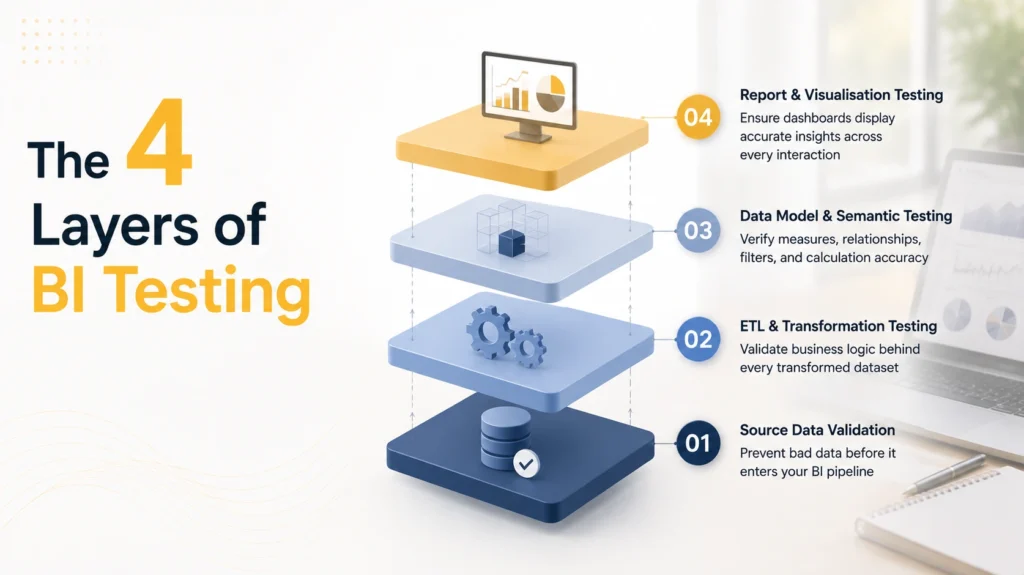
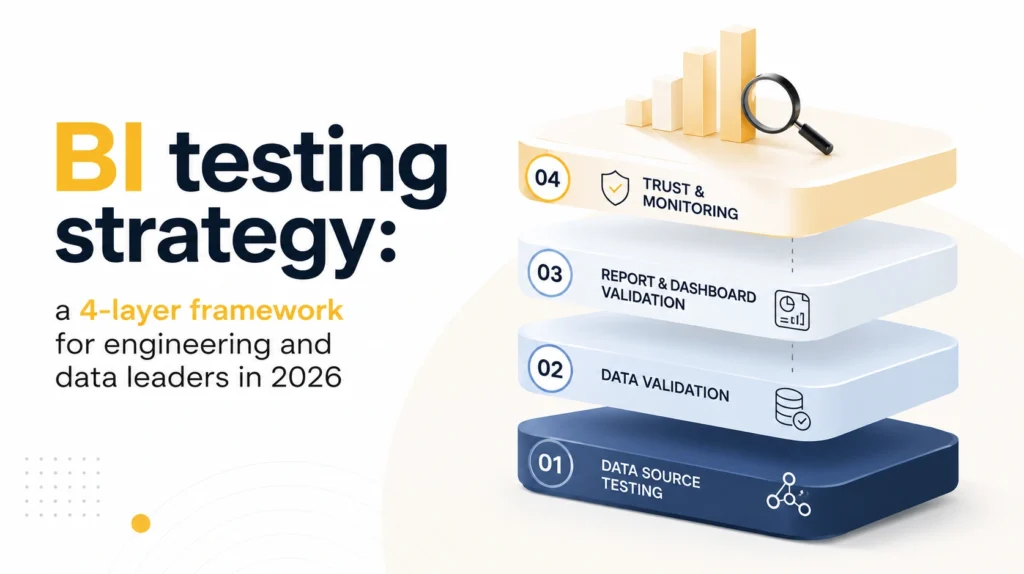
A complete BI testing strategy operates across 4 layers, each catching a different class of defect. Layer 1 tests whether source data arrives in the expected shape and completeness. Layer 2 tests whether ETL transformations produce correct output. Layer 3 tests whether the data model and semantic layer produce correct aggregations and calculations. Layer 4 tests whether the report accurately represents the model. Most programmes invest almost entirely in Layer 4. Most defects that reach decision-makers originate in Layers 2 and 3.
Layer 1: Source data validation
Source data validation confirms that data arriving from upstream systems is complete, in the expected format, within expected value ranges, and arriving on the expected schedule. Failures at this layer produce downstream data issues that BI testing at Layers 2, 3, and 4 cannot catch, because the error is in the data before the BI system ever processes it.
Source data validation catches: missing records from an upstream API that failed silently overnight, a schema change in a source system that reordered columns in a flat file export, a currency field that changed from decimal to integer in a third-party data feed, or a batch job that completed but wrote 0 records because of a silent permission error. Without Layer 1 testing, the BI system processes bad data correctly and produces bad reports faithfully. The dashboard renders. Everything looks fine. The numbers are wrong.
Layer 2: ETL and transformation testing
ETL and transformation testing validates that business logic applied during data transformation produces the correct output. This is where revenue attribution rules, date logic, currency conversion, deduplication, and data type normalisation are applied. Failures here are insidious because the transformation logic often lives in SQL stored procedures, dbt models, or Power Query M code that is not immediately visible to report consumers.
A transformation that correctly calculates monthly revenue for most customers but mishandles customers with mid-month contract changes will produce wrong revenue figures for a specific segment that may not be immediately obvious in the aggregate view. ETL testing catches these through source-to-target comparisons: validating the transformation output against expected values for both standard cases and known edge cases. As QuerySurge describes, the challenge with BI report validation is that most teams focus their testing on the report interface, leaving the transformation logic underneath largely untested and creating hidden exposure to data quality failures.
Layer 3: Data model and semantic layer testing
The data model and semantic layer is the most underinvested layer in most BI testing programmes, and the layer where Power BI-specific bugs most commonly originate. In Power BI, the semantic layer includes the data model relationships, DAX calculated columns and measures, and row-level security rules.
DAX measures are particularly prone to a class of bug that only appears in specific filter contexts: a measure that calculates total revenue correctly in a summary view may double-count when a user drills down by product category due to a many-to-many relationship that is not handled correctly in the measure definition. The measure produces a number in every scenario. It does not produce the right number in every scenario. Testing the data model layer requires generating test cases for each measure across the full range of filter contexts that users will apply, not just the default view. This is precisely the layer that requires domain expertise in test case design: a QA engineer can verify that a measure produces consistent output across contexts; only someone who understands the business rule can verify that the output is correct.
Layer 4: Report and visualisation testing
Report and visualisation testing is the most commonly tested layer and the one that most BI testing tools are built to automate. It validates that the report correctly represents the data model: that filters cascade correctly, that drilldown paths navigate to the right data, that conditional formatting applies correctly, that page-level and report-level filters interact as expected, and that the visual layout renders consistently across device types and browser configurations.
Failures at this layer are the most visible to users and the most straightforward to automate, using either dedicated BI testing tools or general UI automation frameworks. The critical limitation of testing only at this layer: a report can pass every Layer 4 test and still display wrong data if the underlying model has a bug. The report is doing exactly what it was told to do. What it was told to do is wrong.
Power BI testing: the specific challenges the platform introduces
Power BI is the dominant BI platform globally. It holds roughly 30% of the global BI market share, with Microsoft holding approximately 45% of the broader BI market overall. Over 1.5 million organisations use it, and 75% of Fortune 500 companies rely on it for business reporting. This dominance creates testing challenges that do not exist in standard web application testing: DAX measure correctness across filter contexts, row-level security validation across user profiles, DirectQuery vs. Import mode behavioural differences, and cross-workspace dataset dependency management. A BI testing strategy built for Power BI environments needs to address each of these specifically.
DAX measure correctness across filter contexts
DAX is the formula language used to define calculated measures in Power BI. A DAX measure that calculates correctly in one filter context can produce incorrect results in another due to the way Power BI evaluates filter propagation across relationships. The canonical example is a SUMX measure that works correctly in a flat filter context but produces different, and sometimes wrong, results when used within a CALCULATE or ALLEXCEPT modifier that the report author did not anticipate. Testing DAX correctness requires defining expected outputs for each measure across a representative range of filter contexts, not just the default report view. This is the class of bug that passes every visual inspection and every Layer 4 test, and still delivers wrong numbers to the people who depend on them.
Row-level security validation
Row-level security (RLS) ensures that each user role sees only the data they are authorised to see, and that security rules do not accidentally restrict data that should be visible or expose data that should not be. RLS testing requires running each defined role against a test dataset where the expected visible and restricted records are explicitly defined and verified. In a healthcare or financial services context, where data exposure has direct regulatory consequences, RLS testing is not optional: it is a compliance requirement. Most dedicated Power BI testing platforms support RLS validation, but it requires a test dataset that accurately mirrors the production data structure, including the user-to-data mapping that drives the security rules.
DirectQuery vs. Import mode testing
Power BI’s 2 primary data connectivity modes have fundamentally different failure patterns, and they require different testing approaches. Import mode loads data into the Power BI model at refresh time; failures appear at refresh (data staleness, refresh errors, row limit breaches) and should be validated through refresh logs and post-refresh data reconciliation. DirectQuery sends queries to the source database at report render time; failures appear at query execution (performance degradation, timeout, incorrect SQL generation) and require performance testing under representative load in addition to data accuracy validation. A testing programme that was designed for an Import mode environment and then applied unchanged to a DirectQuery environment will miss the entire class of failures that DirectQuery introduces.
Cross-workspace dataset dependency management
When a report in Workspace B uses a published dataset from Workspace A via Power BI’s shared dataset connection, a schema change to the dataset in Workspace A can silently break reports in Workspace B. No error is thrown during the model change. The dependency is discovered when a report consumer notices that a field is missing or a measure is returning a blank. At enterprise scale, where shared datasets serve dozens of reports across multiple workspaces, cataloguing and testing cross-workspace dependencies is a non-trivial operational requirement. Most organisations discover this risk after a production incident rather than before one.
Power BI testing tools: 3 categories and how to choose
Power BI testing tools fall into 3 categories: dedicated BI validation platforms that automate data comparison at the report and dataset level, general data quality tools that test the ETL and transformation layer, and general UI automation frameworks applied to the report interface. The right choice depends on which layer the testing programme most needs to strengthen, not on a universal ranking of platforms.
Dedicated BI testing platforms
These are purpose-built for BI validation and represent the most direct solution for Power BI report testing and dataset regression.
BI Validator by Datagaps is a no-code Power BI automation testing tool that automates functional, regression, stress, and performance testing of reports and dashboards. Its core capability is baseline comparison: capturing an approved report state and comparing every subsequent build against it, flagging visual and data differences. It supports cross-workspace comparison across Development, Test, and Production environments and integrates with CI/CD (continuous integration/continuous delivery) pipelines.
iceDQ tests and certifies Power BI semantic models, datasets, dashboards, and reports before deployment, with strong coverage of source-to-target reconciliation and data validation within the Power BI development lifecycle.
QuerySurge automates data validation between source systems and BI report output, with a dedicated BI tester component that is particularly strong for ETL and transformation layer testing with native Power BI report integration.
General data quality tools
Tools like dbt tests and Great Expectations operate at the data and transformation layer rather than the report layer. dbt tests validate transformation logic in the data pipeline before data reaches Power BI; Great Expectations validates data quality at the source and transformation layers. These tools require more engineering setup than dedicated BI testing platforms but integrate naturally into a modern data stack and provide coverage at the layers that dedicated BI tools typically do not reach.
General UI automation frameworks
Selenium, Playwright, and Cypress can be used to automate Power BI report UI testing: verifying that visuals render, filters respond, and navigation works. They test the interface layer, not the underlying data correctness. They are a reasonable choice for smoke testing report availability and basic interaction after a deployment, but they are not a substitute for data-layer validation. A Selenium test that confirms a revenue figure appears in the correct cell cannot tell you whether that figure is right.
How to choose: if the primary risk is report data accuracy after model changes, start with a dedicated BI testing platform. If the primary risk is ETL transformation correctness, start with dbt tests or Great Expectations integrated into the data pipeline. If the primary risk is report UI reliability post-deployment, UI automation frameworks are appropriate as a supplementary layer.
Power BI automation testing: what to automate and what to leave manual
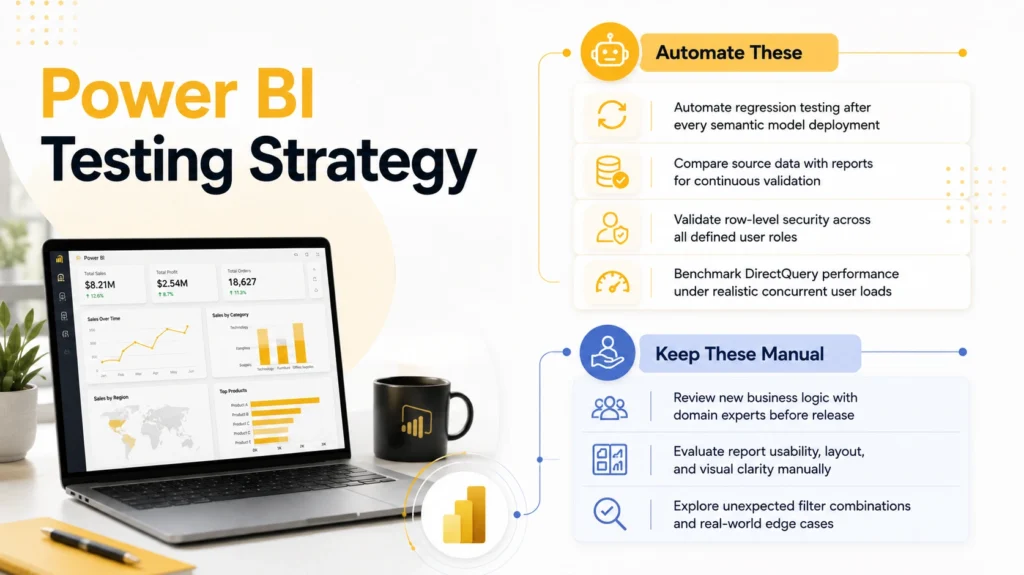
Power BI automation testing delivers the highest return on investment for repeatable, high-volume validation: dataset regression after model changes, source-to-report data reconciliation, RLS validation across user profiles, and performance benchmarking for DirectQuery reports. Manual testing remains essential for new report design review, business logic validation with domain experts, and exploratory testing of complex filter interactions that scripted tests do not anticipate.
Automate these:
Regression testing after every semantic model publish is the highest-value automation target in a Power BI environment. The goal is to compare measure outputs in the new build against an approved baseline for a defined set of test scenarios, and to catch any unintended change before it reaches production.
Source-to-report reconciliation automates the comparison of aggregate figures in the report against the same calculation performed directly against the source data. This is the test that most directly answers the question that matters: does the number in this report match reality?
RLS validation runs each defined security role against a test dataset and verifies that visible and restricted records match the expected mapping. This test should run on every deployment, not just on initial configuration.
Performance benchmarking for DirectQuery reports measures query response time under representative user load and raises an alert when it exceeds defined thresholds. Performance issues in DirectQuery environments tend to compound: a report that responds in 3 seconds with 10 concurrent users may time out with 50.
Keep these manual:
Business logic review for new measures and calculated columns requires a domain expert to confirm that the measure definition correctly implements the business rule before QA tests for consistency. A QA team can verify that a churn rate measure returns consistent results across all filter contexts; they cannot verify that the churn rate formula correctly reflects how the business defines churn. That verification requires someone who knows the business rule.
Visual design and UX review requires a human. Automation confirms that values are correct, not that the report is usable, well-organised, or correctly interpreting the data for its intended audience. A report can pass every automated test and still mislead because of poor layout decisions, unclear labelling, or mismatched chart type.
Exploratory testing for new reports catches the scenarios that scripted tests do not anticipate. Scripted tests validate known scenarios. Human explorers find the filter combination no one thought to test, the edge case that only appears when a specific set of filters is applied in a specific order, or the interaction between report-level and page-level filters that produces an unexpected result.
BI testing best practices: the 5 decisions that determine whether your programme works
The difference between a BI testing programme that catches the bugs that matter and one that provides false assurance comes down to 5 structural decisions made early, not to the tools selected. Tools are an implementation detail. These decisions are architectural.
1. Define test scope across all 4 layers, not just the report layer
A testing plan that only covers Layer 4 will miss ETL logic errors and DAX measure bugs. Explicitly assign ownership of each layer: data engineering owns source validation and ETL testing; BI developers own model testing; QA or BI operations owns report regression. Without explicit assignment, the layers that are hardest to see are also the ones that receive no coverage. Shared ownership without named accountability means no one owns the layers that matter most.
2. Test as close to the data origin as possible
The shift-left principle from software testing applies directly to BI. A bug in a transformation rule is cheapest to fix when it is caught before the data reaches the semantic model. A bug in a DAX measure is cheapest to fix before the report is deployed to production. A bug discovered by an executive who questions a number in a board report is the most expensive to fix: not just technically, but in terms of credibility. Move testing earlier in the pipeline.
3. Establish baselines before any change is deployed
BI regression testing requires an approved baseline state to compare against. For Power BI, this means capturing approved report outputs, including measure values across a defined set of filter scenarios, before any model change is promoted from Development to Test or from Test to Production. Without a baseline, regression testing cannot distinguish an intentional data change from an unintentional one. This discipline requires a decision: what is the canonical approved state, who approves it, and what triggers a re-baseline?
4. Include domain experts in test case design
QA engineers design tests for consistency and completeness: does every report page load? Does every measure return a result? Domain experts design tests for correctness: is this number what the business rule says it should be? Both types of test are necessary, and neither substitutes for the other. A programme run entirely by QA engineers without domain input will test the wrong things with great thoroughness.
5. Integrate BI testing into the deployment pipeline
Treat a Power BI dataset publish as a deployment event that requires quality gates, not a manual upload that is followed by manual checking. Tools like Tabular Editor with the Best Practice Analyser (BPA), ALM (Application Lifecycle Management) Toolkit for model diff-checking, and the XMLA (XML for Analysis) endpoint for programmatic model testing all support integration into a CI/CD pipeline. The pattern is: automated model validation on dataset publish, automated report regression on workspace promotion, and domain expert sign-off before Production promotion. Each gate has a clear owner and a clear action on failure.
When Spark Eighteen built the analytics platform for ClaritasRx, a pharmaceutical analytics company handling sensitive patient-level data for multiple enterprise clients, the data model’s RLS rules were scoped as a first-class architecture concern at the start of the engagement. A bug in the security layer could expose Client A’s patient data in Client B’s reports: not a support ticket, a regulatory incident. Source-to-target reconciliation and RLS validation were built into the deployment process before the first client was onboarded. The cost of catching those issues at design time was a fraction of what a production failure would have cost.
Integrating BI testing with CI/CD pipelines
Power BI’s built-in deployment pipeline across Development, Test, and Production workspaces provides the staging structure for a BI testing programme. The missing piece for most organisations is automated testing between each stage. Adding automated validation gates converts the deployment pipeline from a manual promotion process into a governed quality system.
The tools that make this possible: Tabular Editor with the BPA validates the semantic model against defined quality rules on every model change, catching common DAX anti-patterns, naming convention violations, and model design issues before the model is published. ALM Toolkit diffs Power BI model changes between versions, making it possible to review exactly what changed in a model before promoting it. The XMLA endpoint, available in Power BI Premium and Power BI Pro with Premium Per User, allows programmatic queries against the semantic model, enabling automated testing of measure outputs using code rather than the Power BI interface. BI Validator and iceDQ both offer CI/CD integration for report regression testing at Layer 4.
The deployment gate pattern that works: automated model validation using Tabular Editor BPA on every dataset publish; automated report regression using a dedicated BI testing platform on every workspace promotion; manual domain expert sign-off before Production promotion. Each gate has a defined owner and a defined action when it fails.
The gate that most organisations skip is the one between Test and Production. Deployments from Test to Production happen manually, without automated regression, on the assumption that “we already checked it in Test.” The regression exists to catch what changes between Test and Production: model adjustments made directly in the Test workspace, data refresh differences, or workspace configuration variations that produce different results in the Production environment. The regression is not a recheck of what was already verified. It is a check of what changed since.
Conclusion
BI testing is one of the last areas of software delivery where “it looks right” is still accepted as sufficient evidence that it is right. The consequence of that assumption is not a bug report; it is a budget decision, a hiring plan, or a market entry call made on a number that was wrong.
The move from “we checked the dashboard” to “we validated the data pipeline” is a strategic shift, not a tooling upgrade. It requires a testing scope that reaches back from the report to the source, domain experts who can define what correct looks like at every layer, and a deployment process that enforces quality gates rather than relying on manual review after the fact.
The organisations that build lasting analytical credibility, where executives trust the numbers in their dashboards without needing to verify them offline, are the ones that treat data correctness in BI reports with the same rigour they apply to the code that produces those reports. That standard is achievable. It requires making the 4-layer scope deliberate and assigning ownership to each layer before a single test is written.
If your team is building or rearchitecting a BI testing strategy, integrating Power BI testing into a CI/CD pipeline, or validating a data model that is the source of truth for business decisions, reach out at coffee@sparkeighteen.com. We have built these systems for regulated industries where a data accuracy failure is not a inconvenience. We can help you build it the same way.