A practical guide to deploying dbt templates and Apache Airflow in two days, enabling self-serve analytics without the enterprise price tag.
There is a version of data infrastructure that most early-stage startups assume is out of reach: the kind where non-technical team members can answer their own questions without asking an engineer, where pipelines run reliably on a schedule without someone manually kicking them off, and where the data feeding business decisions is clean, documented, and traceable. That version of the stack has historically been the preserve of companies with dedicated data engineering teams and six-figure tooling budgets.
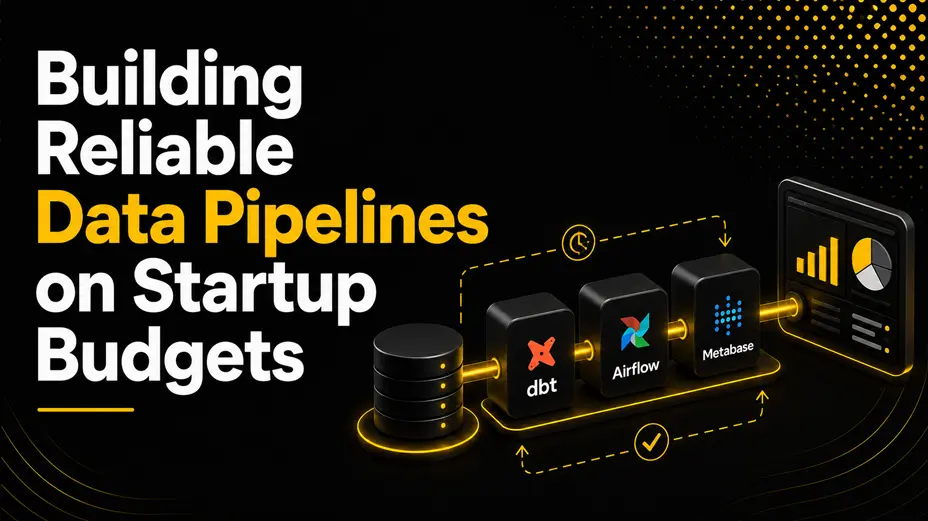
It no longer is. The open-source tooling available to startups in 2025 has genuinely closed the gap between enterprise data infrastructure and what a two-person technical team can deploy in a weekend. dbt Core, Apache Airflow, and a self-serve analytics layer like Metabase or Apache Superset can be assembled into a production-grade data pipeline stack for a monthly infrastructure cost that most startups spend on Slack and Notion combined.
The blocker for most startups is not cost. It is the absence of a deployable template and a clear two-day path from zero to running. This guide covers all three: the correct architecture for startup budget data solutions; the specific dbt templates and Apache Airflow configuration patterns that get you live quickly; and the self-serve analytics layer that means your pipeline delivers value to people who never open a terminal.
Key Takeaways
- Reliable data pipelines are achievable on startup budgets using entirely open-source tooling, with infrastructure costs starting well under £100 per month.
- dbt Core handles the transformation layer: turning raw source data into clean, tested, documented models that the rest of the stack can trust.
- Apache Airflow handles orchestration: scheduling, sequencing, and monitoring the pipeline runs that keep data fresh and failures visible.
- Self-serve analytics, delivered through Metabase or Superset, means the pipeline produces value for non-technical stakeholders without ongoing engineering involvement.
- The two-day deployment path is realistic if the architecture decisions are made before the first line of configuration is written.
- Cost-effective data management at the startup stage is about choosing the right tools for the current scale, not building for the scale you might reach in three years.
1. Why Most Startup Data Pipelines Fail Before They Start
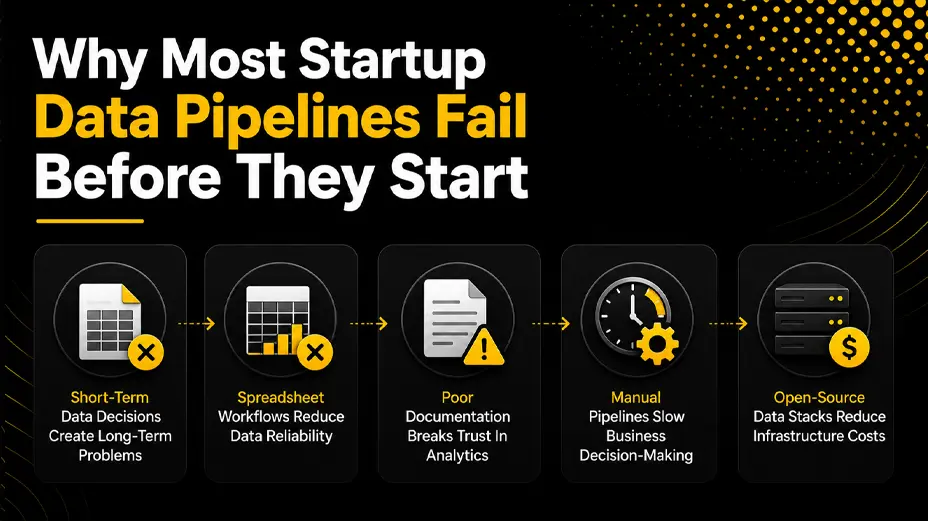
The most common pattern in early-stage startup data infrastructure is a sequence of short-term decisions that compound into a long-term problem. The product database gets used as the analytics database. Spreadsheet exports replace a proper transformation layer. An engineer writes a one-off Python script that becomes the de facto pipeline. Nobody documents any of it, and six months later, nobody is confident the numbers are right.
According to Gartner’s research on data quality, poor data quality costs organisations an average of $12.9 million per year. For startups, the cost is not purely financial: it is the compounding erosion of trust in any number that comes out of the data stack (Source: Gartner).
The reason these patterns persist is not that teams lack the skills to do better. It is that the path from ‘no data infrastructure’ to ‘production-grade data pipeline’ has historically felt like a cliff rather than a ramp. Teams see the enterprise options (Fivetran, Databricks, Snowflake, Looker) and their associated costs, assume that proper infrastructure requires a data engineering team, and fall back on spreadsheets.
The stack this guide describes is not a compromise. It is the same architecture that well-resourced data teams use, assembled from open-source components, deployed on infrastructure that a startup already has or can provision in an hour.
The Four Problems This Stack Solves
- Raw data that nobody trusts: dbt templates introduce testing and documentation at the transformation layer, so every model in the pipeline has defined expectations that are verified on every run.
- Pipelines that run only when someone remembers to run them: Apache Airflow provides scheduling, dependency management, and failure alerting so that data freshness is maintained automatically.
- Analytics that require an engineer: a properly configured self-service analytics layer means that product managers, operations leads, and founders can build their own reports without a SQL query.
- Infrastructure costs that scale faster than the business: the open-source stack described here starts at a near-zero monthly cost and scales incrementally as data volume grows.
2. The Right Stack for Startup Budget Data Solutions
Before getting into deployment, the architecture decision matters. Choosing the right tools for the current stage of the business avoids the most expensive mistake in startup data infrastructure: over-engineering for future scale while the present-day stack fails to deliver basic reliability.
The stack below is deliberately opinionated. Every component is open source, every component has a large community and substantial documentation, and every component can be replaced independently as requirements change. The goal is a deployable data pipeline that works today, not one that is theoretically optimal for a future state.
| Tool | Role in Stack | Cost (Self-Hosted) | Setup Time | Startup Suitability |
| dbt Core | Data transformation layer | Free (open source) | 2–4 hours | Excellent |
| Apache Airflow | Pipeline orchestration | Free (open source) | 4–8 hours | Excellent |
| PostgreSQL | Data warehouse (early stage) | Free / ~£5–20/month managed | 1–2 hours | Excellent |
| BigQuery | Data warehouse (growth stage) | ~£0 first 1 TB/month queried | 1–2 hours | Very Good |
| Metabase | Self-serve analytics layer | Free (open source) | 2–3 hours | Excellent |
| Superset | Self-serve analytics layer | Free (open source) | 3–5 hours | Very Good |
Choosing Your Data Warehouse
For startups with less than 50 GB of data and fewer than five data sources, PostgreSQL is the correct warehouse choice. It is free, it is reliable, it has excellent DBT support, and managed versions on Railway, Supabase, or Render cost between £5 and £20 per month depending on the plan. The temptation to start with BigQuery or Snowflake is understandable, but both introduce query cost complexity that distracts from the more important work of getting clean data flowing.
For startups approaching 100 GB or running queries over very large event tables, BigQuery’s separation of storage and compute becomes genuinely cost-effective. The free tier includes 1 TB of query processing per month and 10 GB of storage, which covers most startups well into their growth phase.
Startup budget principle: Choose the warehouse that fits your data volume today. Migrating from PostgreSQL to BigQuery with a well-structured dbt project takes two to three days. Paying Snowflake’s minimum commitment for two years while your data team is still one person is a harder mistake to undo.
3. dbt Templates: The Transformation Layer That Makes Data Trustworthy
dbt, which stands for ‘data build tool’, is an open-source framework for transforming data inside a warehouse using SQL. It was created by Fishtown Analytics (now dbt Labs) and has become the standard transformation layer for modern data stacks across teams of all sizes.
What DBT templates give a startup that raw SQL scripts do not is structure: a defined project layout, version-controlled models, built-in testing, automatic documentation generation, and a dependency graph that makes the lineage of every metric visible. That structure is what makes cost-effective data management possible at scale, because it means any engineer can understand, modify, and trust the transformation logic without the original author being in the room.
The Three-Layer dbt Template Structure
The standard dbt project structure that most data teams use separates models into three layers, each with a distinct purpose:
- Staging layer (stg_): models that sit directly on top of raw source tables. Each staging model maps one-to-one with a source table, renames columns to a consistent convention, casts data types, and applies no business logic. These are the models that every other model builds on top of, so their reliability matters most.
- Intermediate layer (int_): models that combine staging models to represent business concepts. An int_orders model might join stg_orders with stg_customers and stg_products to create a complete order record. This layer holds the logic that is used in multiple places but is not yet the final output.
- Mart layer (mart_): the models that are exposed to the self-serve analytics layer. These are wide, denormalised tables built for analytical consumption: mart_revenue, mart_user_activity, mart_funnel. They are designed to be queried by non-engineers via Metabase or Superset without further transformation.
This three-layer architecture is not theoretical tidiness. It is the structure that makes analytics workflow automation reliable because failures in the pipeline are isolated to a specific layer, and the dependency graph makes the impact of any failure immediately visible.
DBT Tests: The Feature That Pays for Itself
The built-in testing framework in dbt is one of the most underappreciated features in the open-source data ecosystem. Tests are defined in YAML alongside the models they cover, and they run automatically as part of every dbt run. The four standard test types cover the most common data quality failures:
- not_null: verifies that a column contains no null values in rows where nulls would be invalid.
- unique: verifies that a column contains no duplicate values, typically applied to primary keys.
- accepted_values: verifies that a column contains only values from a defined list, catching incorrect enumerations before they reach the analytics layer.
- relationships: verifies referential integrity between tables, catching orphaned records that indicate upstream data quality issues.
A dbt project with well-written tests turns every pipeline run into an automatic data quality audit. When a test fails, the run fails, the failure is logged in Apache Airflow, and the team is alerted before bad data reaches the self-serve analytics layer.
4. Apache Airflow: Orchestration That Keeps the Pipeline Running
Apache Airflow is an open-source platform for authoring, scheduling, and monitoring workflows. It was created at Airbnb in 2014 and open-sourced the same year. It is now one of the most widely deployed orchestration tools in data engineering, with over 13 million downloads per month on PyPI as of 2024.
For a startup deploying data pipelines, Apache Airflow solves the problem that dbt alone cannot: it schedules the dbt run, handles dependencies between tasks, retries on failure, sends alerts when something goes wrong, and provides a web interface where anyone on the team can see the current state of every pipeline run.
The Minimal Airflow Configuration for a dbt Pipeline
The fastest deployment path for Apache Airflow at the startup stage is Docker Compose. The official Apache Airflow Docker Compose file, available at airflow.apache.org, sets up the scheduler, webserver, and database in a single command. The configuration required to run a dbt project on a schedule requires three things:
- A DAG file that defines the pipeline: which dbt commands to run, in which order, and on which schedule. A basic daily dbt run DAG is fewer than 30 lines of Python.
- The dbt project is mounted into the Airflow container so that the dbt run command has access to the models, profiles, and configuration.
- Environment variables for the database connection, configured in the Airflow UI or via a .env file, so that credentials are not hardcoded into the DAG.
Beyond this minimum, the Airflow configuration that adds the most value for startup data pipelines is email or Slack alerting on failure. A pipeline that fails silently is worse than no pipeline, because it creates the illusion of data freshness while actually serving stale or broken data to the self-serve analytics layer.
Managed Airflow: When Self-Hosting Stops Making Sense
Self-hosting Apache Airflow on a small virtual machine (a £10 to £20 per month instance on DigitalOcean, Hetzner, or Render) is cost-effective for most startups in the first 12 to 18 months. When the engineering overhead of managing the Airflow instance itself becomes significant, the managed options become worth evaluating: Astronomer Cloud, Google Cloud Composer, and Amazon MWAA all provide managed Airflow at a cost that remains reasonable for teams with moderate pipeline complexity.
Analytics workflow automation principle: Apache Airflow’s value is not in the first pipeline it runs. It is in the tenth, the twentieth, and the one that someone tried to add manually and forgot about. Orchestration compounds in value as the number of pipelines grows.
5. The Two-Day Deployment Plan: From Zero to Running Data Pipeline
The two-day timeline below assumes one engineer with working knowledge of SQL, basic Python, and command-line tools. It does not assume prior experience with dbt or Apache Airflow. The official documentation for both tools is comprehensive enough to cover the gaps, and the community Slack workspaces for both projects are genuinely responsive.
| Phase | Day 1 Tasks | Day 2 Tasks |
| Morning | Set up PostgreSQL or BigQuery warehouse. Configure dbt project structure: profiles.yml, dbt_project.yml, sources.yml. | Build staging dbt models from raw source tables. Write first transformation models. Run dbt test suite. |
| Afternoon | Install Apache Airflow via Docker Compose. Define the first DAG pointing to dbt run command. Confirm scheduler is active. | Connect Metabase (or Superset) to warehouse. Build the first self-serve analytics dashboard. Share with a non-technical stakeholder for validation. |
| End of Day | Verify pipeline runs end-to-end manually. Confirm dbt models compile and Airflow DAG triggers correctly. | Schedule recurring Airflow DAG (daily or hourly). Document the stack. The pipeline is live. |
The two-day timeline is achievable because the architecture decisions (warehouse choice, dbt project structure, and Airflow deployment method) are made before the first line of configuration is written. Teams that try to make these decisions during deployment typically take five to ten days. Teams that make them before starting consistently land in two.
The dbt Template That Accelerates Day One
The fastest starting point for the dbt project structure is the dbt starter project, which is generated by the dbt init command and provides the directory structure, a sample dbt_project.yml, and placeholder model folders. From this base, the staging layer models are the first priority, because every subsequent model depends on them being correct.
A useful convention for startup dbt projects: name every source table with the prefix raw_ in the warehouse, create one staging model per source table on day one, and resist the temptation to build mart models until the staging layer is tested and trusted. The mart layer built on unstable staging models compounds the unreliability upward through the stack.
6. Self-Serve Analytics: Making the Pipeline Valuable to Non-Engineers
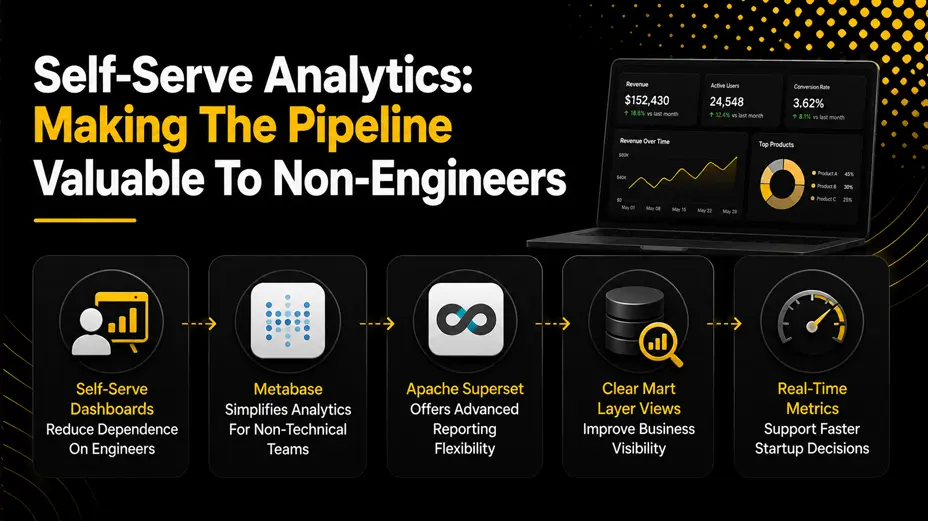
A data pipeline that requires a SQL query to extract value is not self-serve. It is a slightly more reliable version of the spreadsheet exports it replaced. Self-serve analytics means that the mart layer models built in dbt are accessible to product managers, operations leads, and founders through a tool that requires no technical knowledge to use.
The two open-source options that work best with a dbt and Apache Airflow stack are Metabase and Apache Superset. Both connect directly to the data warehouse, both can be self-hosted for free, and both provide the chart-building and dashboard features that cover the majority of startup analytics requirements.
Metabase vs Superset: Choosing the Right Self-Serve Layer
- Metabase: the better choice for teams where the primary users of the analytics layer are non-technical. The question-builder interface requires no SQL, the dashboard sharing is simple, and the setup process is the most straightforward of any open-source BI tool. The open-source edition is free; the hosted cloud edition starts at £400 per month for teams that prefer not to self-host.
- Apache Superset: the better choice for teams with a technical user base who want more control over chart types, SQL Lab access for direct queries, and tighter integration with the dbt semantic layer. The setup is slightly more involved than Metabase, but the flexibility it offers is meaningfully greater for teams with complex reporting requirements.
Whichever tool is chosen, the configuration that produces the most value for startup budget data solutions is connecting the tool directly to the mart layer views in the warehouse, naming those views clearly (revenue_by_month, user_cohort_retention, pipeline_by_stage), and creating a small library of shared dashboards that answer the questions the team asks most often.
When a founder can check revenue, retention, and funnel metrics without asking an engineer, the data pipeline has delivered its core promise. That outcome, achieved with open-source tooling and two days of setup, is the definition of cost-effective data management at the startup stage.
Final Thoughts
Reliable data pipelines on startup budgets are not a compromise. The open-source stack of dbt templates, Apache Airflow, and a self-serve analytics layer delivers the same architectural foundations that well-resourced data teams build on, at a fraction of the cost, in a fraction of the time.
The two-day deployment path is realistic when the architecture decisions are made upfront: the right warehouse for the current data volume, the three-layer dbt template structure that keeps transformation logic clean and testable, the minimal Airflow configuration that schedules runs and alerts on failure, and the self-serve analytics layer that makes the pipeline valuable to the whole team rather than just the engineers who built it.
The most important thing to avoid is the mistake of building for future scale before the present-day stack is working. A data pipeline that runs reliably, produces trusted numbers, and can be understood by the next engineer to join the team is worth more than an architecturally sophisticated system that nobody fully understands or trusts. Start with the stack described here, add complexity only when the current scale genuinely demands it, and treat the dbt project and the Airflow DAGs with the same engineering discipline applied to the product codebase.
That discipline, applied consistently, is what turns a two-day deployment into a long-term data foundation.
If your team is working through a data pipeline architecture decision or wants to think through the right stack for your current stage, reach out at coffee@sparkeighteen.com.