A QA team at a scaling software company has 2,000 automated tests running on every commit. Their CI/CD (continuous integration and continuous delivery) pipeline is live. Deployments moved from weekly to daily. On paper, everything is working. In practice, the pipeline fails 30% of the time for reasons no one immediately investigates. Developers have learned to re-run failed tests rather than examine them. The QA lead spends 3 days per sprint maintaining tests written 6 months ago. And the last 3 production bugs were not caught by a single automated test.
The automation suite exists. The quality assurance does not.
Teams experiencing flaky tests jumped from 10% in 2022 to 26% in 2025, a 160% increase as CI/CD pipeline complexity grew (Autonoma, 2025). That number does not represent a tooling failure. It represents automation suites built without a clear strategy for what to automate, at which layer of the stack, and who is responsible for keeping them healthy. This guide covers the real limitations of automation testing, why most of them are symptoms of a fixable strategy problem rather than inherent technology constraints, and what a test automation strategy that actually delivers looks like.
Key takeaways
- Most automation testing limitations are symptoms of a flawed test automation strategy, not failures of the technology itself.
- There are 7 limitations that QA teams consistently underestimate: setup cost, maintenance overhead, flaky tests, the boundaries of human judgment, false confidence, mobile complexity, and CI/CD pipeline saturation.
- Manual testing and automation testing are complementary, not competing. The decision is which to apply where, and that boundary requires active management.
- The test pyramid framework explains why most automation suites underperform: too much investment in UI automation, not enough in API and unit testing.
- A test automation strategy is 4 explicit decisions made before the first tool is chosen: what to automate, which layer to prioritise, who owns the suite’s health, and how quality is measured beyond coverage percentages.
Why most automation testing limitations are strategy problems
The real limitations of automation testing are not primarily tool problems. They are the predictable consequences of 3 decisions that most teams make in the wrong order: they choose automated testing platforms before deciding what to automate, they start writing tests before defining ownership of the suite, and they measure success by coverage percentage rather than by whether the automation is catching real defects.
Teams that automate in this sequence build suites that look productive in the first quarter and become a liability by the third. The automation inherits all the same coverage gaps as the manual testing it replaced, adds a maintenance burden on top, and gradually loses the trust of the developers who depend on it. The tools are usually fine. The decisions made before the tools were opened are not.
3 upstream decisions determine whether QA automation testing delivers value or technical debt.
The first is what to automate. Not every test that can be automated should be automated. Tests for features that change every sprint, tests that require a human to decide whether the output is correct, and tests that have never caught a real bug in 12 months are all candidates for the manual column or for retirement. Automating them adds maintenance burden without adding quality signal.
The second is at which layer of the stack to automate. Automation testing produces very different returns depending on whether it sits at the unit level, the API and integration level, or the UI and end-to-end level. Most suites get this allocation wrong in the same direction, and the consequences are predictable.
The third is who owns the suite’s ongoing health. An automation suite without a clear owner decays. Flaky tests accumulate. Coverage drifts from the current codebase. Developers stop trusting the results and start re-running failures to see if they pass next time. That behaviour is not laziness; it is a rational response to a suite that has stopped producing reliable signals.
The 7 real limitations of automation testing
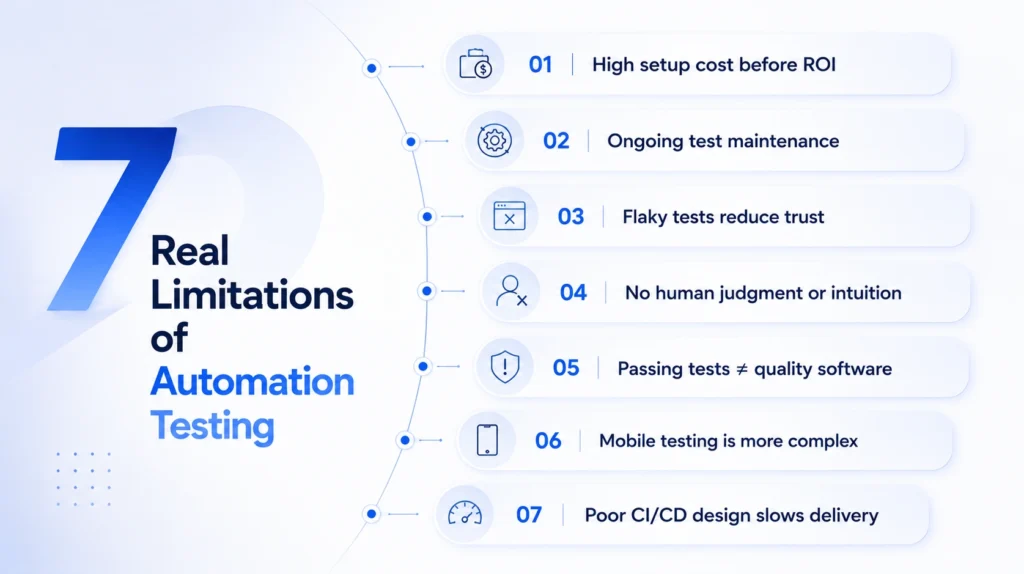
The limitations of automation testing fall into 2 categories: those that are intrinsic to what automation can do (it cannot replicate human judgment, intuition, or creative exploration), and those that are consequences of how automation is implemented (maintenance cost, flaky tests, slow pipelines). Understanding which category a limitation belongs to determines the correct response. Intrinsic limitations call for strategic boundaries between automation and manual testing. Implementation limitations call for better architecture decisions.
1. High initial setup cost and a ramp-up window before ROI appears
Building a test automation suite takes time: selecting and configuring tools, writing the initial test cases, stabilising the suite against a live codebase, and integrating it into the CI/CD pipeline. For projects with short delivery timelines, for features that are still being defined, or for tests that will only be run once or twice, the setup cost never pays back. The limitation is real and the right response is not to automate those cases. The mistake is treating automation as a universal obligation rather than a context-dependent choice.
2. Test maintenance overhead compounds with suite size
Test maintenance accounts for 25 to 50% of the total QA budget in mature automation suites, according to multiple editions of the Capgemini/Sogeti/OpenText World Quality Report. Every application change — a renamed UI element, a refactored API (application programming interface) endpoint, a reordered user flow — can break dozens of tests at once. UI-heavy suites are particularly exposed because the locators that test scripts use to interact with the interface (element IDs, CSS selectors, XPath expressions) are fragile by nature: a front-end refactor that does not change any functionality can still break 200 tests. Teams that automate UI automation aggressively without accounting for ongoing maintenance cost are building a slow-burning liability.
3. Flaky tests erode the entire suite’s credibility
A flaky test is one that passes and fails non-deterministically on the same code. Flaky tests currently consume over 20% of CI engineering time at scale (Autonoma, 2025). Google’s internal research found that flaky tests account for 4.56% of all CI (continuous integration) test failures and consume more than 2% of developer coding time. The cost is not just the engineering hours. The deeper cost is that once developers learn that test failures are unreliable signals, they stop treating them as actionable. The automation suite becomes background noise, and the quality gate that it was supposed to enforce breaks down quietly. A single flaky test in a 500-test suite is a nuisance. 50 flaky tests in a 500-test suite is a credibility crisis.
4. Automation cannot replicate human judgment, emotional response, or creative exploration
Automation testing tools can verify that a button exists, is visible, and returns the expected response when clicked. They cannot evaluate whether the button is in the right place, whether the error message it triggers is clear to a first-time user who is already confused, whether the navigation flow feels intuitive, or whether the overall experience matches what was intended. Exploratory testing, usability evaluation, and accessibility assessment for complex interaction patterns require human testers. This is not a gap that better tooling will close: it is a fundamental difference between scripted verification and human experience.
The accessibility dimension is particularly significant. Automated accessibility testing tools catch between 20 and 40% of real accessibility issues, according to BrowserStack’s 2026 research. The remaining 60 to 80% requires manual review with assistive technologies like screen readers, keyboard-only navigation testing, and feedback from users with disabilities. Teams that report accessibility compliance based on automated test results alone are reporting on an incomplete picture.
5. Passing tests do not mean working software
A test suite validates exactly what it was written to test. If the test cases were written against requirements that were incomplete, misunderstood, or simply wrong, a 100% pass rate proves only that the implementation matches a flawed specification. This is the false confidence limitation: automation amplifies the quality of the decisions made upstream of it. A well-written suite amplifies good requirements. A poorly written suite amplifies bad ones. The tests cannot correct for the thinking that produced them.
6. Mobile test automation carries complexity that web automation does not
Web automation deals with a manageable set of browsers, viewport sizes, and rendering engines. Mobile test automation faces device fragmentation at a completely different scale: thousands of device and OS (operating system) version combinations, combined with the additional complexity of native, hybrid, and web views within a single application. Interactions that are standard on mobile — gesture-based navigation, biometric authentication, camera inputs, background process behaviour — are either difficult or impossible to replicate reliably in emulators. Mobile testing complexity is one of the fastest-growing QA pain points in 2026, according to Global App Testing’s annual challenges report.
7. CI/CD pipeline automation testing can slow delivery when the architecture is wrong
Automation is meant to accelerate delivery. When the test architecture is wrong, it does the opposite. A suite designed for manual execution and bolted onto a CI/CD pipeline produces long build times, environment instability between runs, and data corruption when integration tests share state across parallel executions. A pipeline that takes 45 minutes to complete and fails unpredictably on one-third of runs is not a safety net. It is a deployment blocker that developers will eventually learn to work around. At scale, Atlassian published data showing that test flakiness wastes over 150,000 developer hours per year across their engineering organisation.
Manual testing and automation testing: where the boundary sits
Manual testing and automation testing are not competing strategies. They produce different types of quality signal, and a QA team needs both. Automation produces fast, repeatable, objective signals: did this function return the expected output? Did this API return the correct status code? Did the regression suite pass after this change? Manual testing produces judgment-dependent signals: is this flow intuitive? Is this error message helpful? Is this behaviour actually correct, even though the test passed?
The boundary between them is not fixed. It is a decision that should be revisited regularly as the product, the team, and the test suite evolve.
What belongs in the automation column: regression suites for features that have reached functional stability, API contract and integration testing, CI/CD quality gates, performance baselines, and repetitive high-volume validation scenarios where consistency matters more than exploration.
What belongs in the manual column: exploratory testing for new features and unclear requirements, usability and UX (user experience) evaluation, accessibility auditing beyond automated tooling, one-off investigations triggered by production incidents, and any test where a human must interpret whether the result is genuinely correct rather than technically matching.
What belongs in neither column: tests for features that are still changing every sprint (automate once the feature has stabilised), tests that have never caught a real defect and have no clear rationale for existing, and tests that require more environment setup time than the manual verification they replace.
The error most teams make is treating the boundary as a migration: automate everything currently done manually, then move on. The boundary is not a destination. It requires active management. A test correctly left manual at month 1 might be correctly automated at month 6. An automated test that was useful at launch might be a maintenance burden at month 12 if the feature it covers has been deprecated.
The test pyramid: why getting the layer allocation wrong is the most expensive mistake in automation
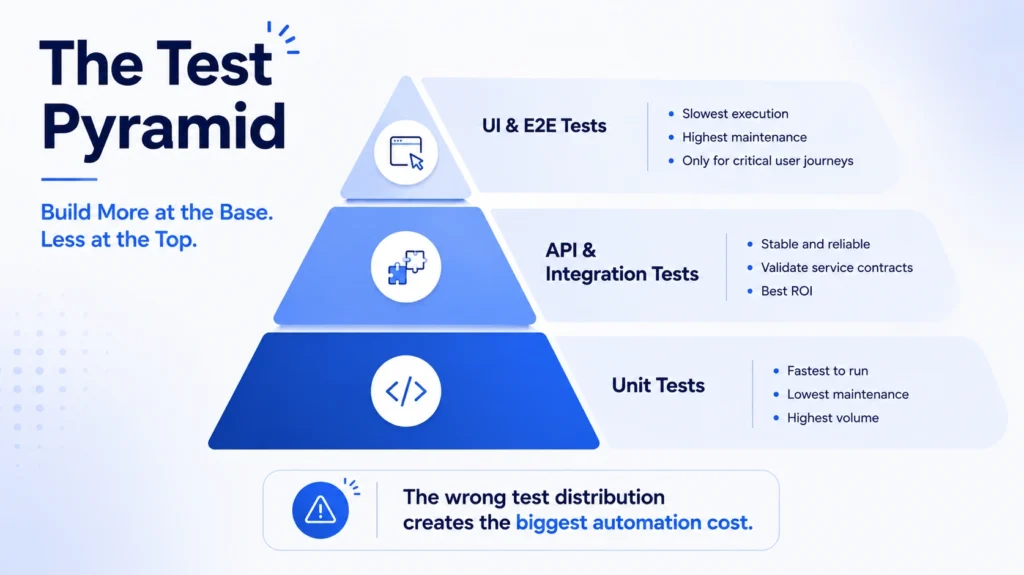
The test pyramid is a framework for allocating automation effort across 3 layers: many fast unit tests at the base, fewer integration and API tests in the middle, and a small number of end-to-end (E2E) UI tests at the top. The logic is straightforward: tests at the base of the pyramid are the cheapest to run, the fastest to execute, and the easiest to maintain. Tests at the top are the most expensive, the slowest, and the most fragile.
Most automation suites invert this. They are built with heavy UI and E2E automation, sparse API testing, and minimal unit coverage. The inverted pyramid is the single most common cause of the maintenance and reliability problems described in this guide.
Unit tests run in milliseconds, test specific business logic in isolation, and are cheap to maintain because they test units of code that do not depend on UI structure or external services. Their limitation is that writing them requires developers to do so at code time. QA teams often have limited influence over unit test coverage, which makes it a shared responsibility between engineering and QA.
API and integration tests test the contracts between services and the integration points where real bugs originate. They run in seconds, are stable relative to UI tests (API contracts change less frequently than UI element locators), and can gate every pull request in a CI/CD pipeline without meaningfully slowing the build. Automation of API testing delivers the highest return on investment per test for most teams. Tools like Postman/Newman, REST Assured, pytest, and k6 (for performance) make this layer accessible without significant infrastructure overhead.
UI and E2E tests test the full application through the user interface. They are the most expensive tests to maintain: UI locators break when front-end code changes, visual modifications fail tests that do not reflect actual defects, and E2E suites take minutes to run rather than seconds. Their value is in smoke testing critical user journeys before a release, not in providing comprehensive regression coverage. A small, stable, well-maintained set of E2E tests is an asset. A large, sprawling E2E suite is almost always a maintenance liability.
The practical implication: teams rebuilding or evaluating their automation testing process should start by mapping their current test distribution across the 3 layers, then identify whether their investment matches the cost-to-value profile of each layer. If the majority of automated tests are at the UI layer, that is where the maintenance burden is coming from.
In the McKesson Glide Health engagement, test automation was designed as part of the architecture from the first sprint, not added later. The microservices design gave each service bounded test responsibilities. Unit tests covered business logic at the service level. Integration tests covered service-to-service communication. E2E tests were limited to a small set of critical revenue cycle management (RCM) claims processing journeys. The result was a CI/CD pipeline that the development team trusted because the test results were reliable and the failure signals were meaningful.
CI/CD pipeline automation testing: the failure patterns that slow delivery
A CI/CD pipeline with a well-architected automation suite produces fast, reliable feedback on every commit. A pipeline with a poorly architected suite produces slow, unreliable feedback that developers learn to distrust. The difference is rarely the testing tools. It is almost always the architecture decisions made when the suite was built.
4 failure patterns account for most CI/CD pipeline automation problems.
Test order dependency is when tests only produce reliable results if they run in a specific sequence. Independent tests do not care what order they run in. Order-dependent tests break in unpredictable ways when the suite is parallelised or when individual tests are re-run in isolation. Any test that requires the state from a previous test to run correctly is a design problem, not a flakiness problem.
Environment instability produces the pattern of tests passing locally and failing in the CI/CD environment. This is almost always a configuration difference between the local development environment and the pipeline environment, not a code defect. The correct resolution is environment parity, not test re-runs. When environment instability is persistent, it is a DevOps (development and operations) infrastructure problem wearing a QA problem’s appearance.
Data pollution between parallel test runs happens when integration and API tests read and write shared test data. One test’s write operation corrupts the state that a parallel test expects to read. The fix requires test data isolation by design: each test run gets its own data scope, either through database transaction rollbacks, dynamic test data generation, or environment-level isolation. This is an architecture decision that cannot be retrofitted cheaply.
Wrong tests gating the wrong pipeline stages is the pattern where slow, expensive E2E tests run on every commit when they should only run before a release, while fast unit tests are not gating early enough. Fast tests should provide immediate feedback at every commit. Slow tests should validate readiness at release-gate points. Getting the stage assignment right is the single most impactful change most teams can make to pipeline speed without changing any test logic.
One additional data point worth noting: only 26% of teams enforce automated quality gates that block deployments when tests fail, despite 74% of teams running automated CI pipelines (Autonoma, 2026). The other 74% have automation that produces signals they are not acting on. That is a monitoring system, not a test automation strategy.
Mobile test automation: the complexity most teams discover too late
Mobile test automation is structurally more complex than web automation, and the gap is growing rather than narrowing. 3 factors drive the complexity.
Device fragmentation has no equivalent in web testing. Browsers number in the low dozens across all platforms; mobile testing involves thousands of device and OS version combinations, each potentially producing different behaviour for the same application code. Even limiting coverage to the top 10 device/OS combinations in a market still requires either physical devices or emulators that do not fully replicate hardware behaviour.
The mix of native, hybrid, and web views within a single application adds a layer of testing complexity that web automation frameworks were not designed for. A healthcare application might render the authentication screen as a native view, the clinical dashboard as a hybrid view, and the patient education content as a web view inside a web container. Automation tools that work well for one view type often require separate frameworks, separate tooling, or significant configuration to handle the others.
Interaction complexity goes beyond what standard web automation handles. Gesture-based navigation (swipe, pinch, long-press), biometric authentication, camera and microphone permissions, background process behaviour, push notifications, and deep links all require either specialised automation frameworks or manual testing. Emulators handle some of these in limited ways; real devices handle all of them as actual users experience them.
The practical approach: use emulators for development-time feedback where speed matters more than complete fidelity. Use real devices for pre-release smoke suites on the highest-traffic device/OS combinations. Cloud device farms such as BrowserStack, Sauce Labs, and AWS Device Farm provide real-device coverage without the overhead of maintaining a physical device lab. Prioritise automating smoke tests for the most critical user flows, and keep manual testing for new features, OS version edge cases, and accessibility evaluation on mobile.
Automation of API testing: the highest-ROI layer most teams underinvest in
If there is one area where most QA teams have a clear, immediate opportunity to improve their automation return on investment, it is API testing. API tests run in seconds, not minutes. They test the layer of the application where the majority of real defects originate. They are stable relative to UI tests because API contracts change less frequently than interface elements. And they can be integrated into a CI/CD pipeline to gate every pull request without adding meaningful build time.
API test automation covers 4 categories of validation. Contract testing verifies that each service’s API behaves according to its documented specification. Integration testing verifies that services communicate correctly with each other under the expected range of inputs and error conditions. Performance baseline testing establishes normal response time and throughput benchmarks and alerts when they degrade. Security regression testing verifies that authentication, authorisation, and input validation controls remain in place after each code change.
Teams that have invested primarily in UI automation and are experiencing maintenance problems will often find that shifting investment towards API and integration testing reduces both flakiness and maintenance overhead while improving defect detection. The bugs that reach production are more often integration failures and edge case handling errors than UI interaction problems. API tests catch those at the point where they are cheapest to fix.
Building a test automation strategy that works
A test automation strategy is not a list of automated testing tools or a target coverage number. It is 4 explicit decisions that should be made before the first test is written.
Decision 1: what to automate. Define explicitly which test cases belong in the automation suite and which belong in the manual testing column. Use the criteria from the earlier boundary discussion: stable features, repeatable scenarios, tests with a clear pass/fail condition, and tests that would catch real defects if they ran on every commit. Resist the pressure to automate everything; a smaller, stable, trusted suite is more valuable than a large, fragile one.
Decision 2: which layer to invest in first. If the existing suite is UI-heavy, the next investment should go into API and integration tests before adding more UI coverage. If the suite has no unit test coverage, that conversation needs to happen with the engineering team, because unit test ownership sits primarily with developers. Map the current distribution and make the next investment where the cost-to-value ratio is best.
Decision 3: who owns the suite’s health. Decide explicitly whether developers own test maintenance as part of their definition of done, or whether a dedicated automation engineer owns the suite. Either model can work. Shared ownership with no clear accountability does not. The suite’s health must be somebody’s responsibility, with the authority and time to act on it.
Decision 4: how quality is measured. Define 2 to 3 metrics beyond coverage percentage. Useful options: defect escape rate (bugs that reached production that the automation suite should have caught), build stability rate (percentage of pipeline runs that produce reliable results without re-runs), and mean time to feedback (time from commit to a reliable pass/fail signal). These metrics reveal whether the automation is working as intended. Coverage tells you what was tested. These metrics tell you whether the testing is making the software better.
Conclusion
The most important thing to understand about the limitations of automation testing is that they compound. A suite built at the wrong layer, with unclear ownership and no quality metrics, does not stay stable. It becomes harder to maintain, slower to run, and less trusted over time. The teams that get automation right are not always the ones with the most sophisticated automated testing platforms. They are the ones that treated the test automation strategy as a design decision before the first test was written, and that maintained it with the same discipline they apply to the rest of the codebase.
Automation testing done well is not a replacement for QA thinking. It is a force multiplier for it. Every hour a QA engineer does not spend re-running a regression suite manually is an hour available for exploratory testing, edge case investigation, and the judgment-dependent work that no automation tool will ever do. That is the correct ambition for a test automation strategy: not to automate as much as possible, but to automate the right things well enough that the humans can focus on the work that actually requires them.
If your team is evaluating its current automation approach, rebuilding a suite that has become a maintenance liability, or designing quality assurance automation for a new platform, write to us at coffee@sparkeighteen.com.