
Vue.js has earned its position as one of the most developer-friendly JavaScript frameworks in production use today. With approximately 8.9 million weekly npm downloads and over 53,000 GitHub stars, the Vue.js ecosystem sits among the top three frontend frameworks globally, holding 17.6% developer adoption in the 2025 Stack Overflow survey. What makes the Vue.js framework compelling is not just the core library but the ecosystem built around it: a mature set of frameworks, VueJS Libraries, and tools that extend Vue into production-grade web and mobile applications.
The challenge for engineering teams is not whether to choose Vue.js but which combination of Vue.js frameworks, UI libraries, and utility tools will serve their application’s requirements. A content-heavy marketing site has different needs from a cross-platform enterprise dashboard. A single-page application built for speed has different rendering requirements from a public-facing storefront that needs search engine visibility. Choosing the wrong Vue.js framework at the start of a project creates migration costs that compound over time.
This guide maps the complete Vue.js ecosystem, from full-stack frameworks like Nuxt and Quasar through UI component libraries, state management tools, and routing utilities. Each section explains what the tool is, what it is best suited for, and when to choose something else. The goal is to give engineering leads, architects, and product teams a clear, honest reference for making Vue.js decisions that hold up across the full lifecycle of an application.
Which Vue.js framework or library should you choose?
The right choice depends on the type of application being built, rendering requirements, and the team’s existing technical context. For most content or SEO-driven applications, Nuxt is the default starting point. For cross-platform needs (web, mobile, and desktop from one codebase), Quasar is the strongest option. For Vue.js development that prioritises raw speed and minimal overhead, Vite plus Vue is the right foundation.
| Need | Recommended Option |
| SEO and SSR | Nuxt |
| Cross-platform | Quasar |
| Fast SPA / lightweight | Vite + Vue |
| Material Design UI | Vuetify |
| Full-featured enterprise UI | PrimeVue |
| Minimal design-system UI | Naive UI |
| State management | Pinia |
| Routing | Vue Router |
Key takeaways
- Vue.js frameworks are not interchangeable: Nuxt, Quasar, and Vite serve different application types and rendering requirements.
- VueJS Libraries fall into distinct categories: UI component libraries, state management, routing, data fetching, and form validation.
- Choosing a vue.js ui library based on design system fit matters more than choosing by GitHub stars alone.
- Pinia has replaced Vuex as the official Vue.js state management solution; Vuex is in maintenance mode.
- Vue.js apps built for SEO require server-side or static rendering; client-side-only SPAs will not rank well.
- API integration, rendering strategy, and component scalability are the three variables that most affect long-term Vue.js development quality.
What is Vue.js and why is it used for app development?
Vue.js is a progressive JavaScript framework for building user interfaces and single-page applications. Unlike monolithic frameworks that dictate an entire application architecture, the Vue.js framework is designed to be incrementally adoptable: teams can use as little or as much of the ecosystem as their project requires. The core library focuses on the view layer only, while VueJS Libraries and third-party integrations extend its capabilities into routing, state management, server rendering, and beyond.
Vue.js apps are characterised by component-based architecture, reactive data binding, and a template syntax that blends HTML and JavaScript in a way that most developers find straightforward to pick up. The framework’s author Evan You originally designed Vue as a more approachable alternative to Angular, and that focus on developer experience has remained central to every major release.
Vue.js core concepts
Vue.js is built around three core concepts: the Options API (the original structure), the Composition API (introduced in Vue 3 and now preferred for complex applications), and Single File Components (SFCs). SFCs bundle the template, logic, and styles for a vue.js component into a single .vue file, which keeps the codebase organised and makes component reuse straightforward. Vue 3’s Composition API offers better TypeScript support, improved code reuse through composables, and more explicit control over reactivity, all of which matter at scale.
Vue.js for web applications
The core Vue.js framework excels at interactive web applications where the UI updates dynamically without full page reloads. Vue’s reactivity system tracks dependencies automatically, re-rendering only what has changed rather than diffing a large virtual DOM tree blindly. This makes vue.js apps efficient for dashboards, admin panels, and data-heavy internal tools where the state changes frequently and performance matters.
Vue.js for single-page applications
Vue.js is a natural fit for single-page applications (SPAs), particularly when combined with Vue Router for client-side navigation and Pinia for state management. A vue.js frontend built as a pure SPA delivers a fast, app-like experience after the initial load. The tradeoff is that SPAs are harder to crawl for search engines and slower on first load compared to server-rendered alternatives. For public-facing Vue.js apps that need search engine visibility, Nuxt or static site generation addresses this.
Vue.js for mobile and cross-platform applications
The Vue.js ecosystem supports mobile and cross-platform development through Quasar’s Capacitor and Cordova integrations, NativeScript for truly native mobile components, and Progressive Web App capabilities available in both Nuxt and Quasar. Teams that want to deliver web, mobile, and desktop apps from a single Vue.js codebase will find Quasar the most complete solution, while teams focused purely on web will find Nuxt sufficient.
Vue.js frameworks vs Vue.js libraries: what is the difference?
Understanding the distinction between Vue.js frameworks and VueJS Libraries is essential before evaluating specific tools. A Vue.js framework provides an opinionated structure for the entire application: routing conventions, rendering modes, build configuration, and deployment targets are all handled or scaffolded by the framework. A Vue.js library, by contrast, solves one specific problem and integrates into whatever application structure the team has already established.
This distinction matters because choosing a Vue.js framework is an architectural decision that shapes the whole project, while choosing a vue.js component library or state management library is a narrower technical decision that can be changed later at lower cost.
| Dimension | Vue.js Framework | Vue.js Library |
| Scope | Full application structure | Specific functionality |
| Opinions | High (routing, rendering, build) | Low to medium |
| Replaceability | Low (significant migration effort) | Medium to high |
| Examples | Nuxt, Quasar | Pinia, Vuetify, PrimeVue |
| Learning curve | Higher | Lower |
| When to use | New applications, full control needed | Adding capability to existing apps |
Best Vue.js frameworks and libraries at a glance
The tables below give a quick-reference overview of the major Vue.js frameworks and VueJS Libraries in the current ecosystem. Each row summarises the key dimensions engineering teams evaluate when making a selection.
Framework comparison
| Vue.js Framework | Rendering | SEO | Mobile | Performance | Learning Curve | Ecosystem |
| Nuxt | SSR, SSG, ISR, SPA | Excellent | Via PWA | High | Medium | Very large |
| Quasar | SSR, SSG, SPA, PWA | Good | Native + PWA | High | Medium-high | Large |
| Vite + Vue | SPA / CSR | Poor (without SSR plugin) | Via PWA | Very high | Low | Vast |
UI library comparison
| Vue.js UI Library | Components | Design System | Bundle Size | Enterprise Ready |
| Vuetify | 80+ | Material Design | Medium | Yes |
| PrimeVue | 90+ | Flexible / Tailwind | Light-medium | Yes |
| Element Plus | 70+ | Custom (Chinese enterprise) | Medium-large | Yes |
| Naive UI | 80+ | Custom (TypeScript-first) | Light | Partial |
| Quasar UI Components | 70+ | Material + Custom | Medium | Yes |
Best Vue.js frameworks for app development

The Vue.js framework landscape today has three major production-grade options. Nuxt and Quasar are full meta-frameworks that abstract the build system and rendering configuration. Vite plus Vue is not a meta-framework in the same sense but is the fastest and most lightweight foundation for teams that want to assemble their own Vue.js framework stack.
Each of the following sections covers what the framework is best suited for, its key features, and the situations where it is the right or wrong call.
Nuxt
Nuxt is the most widely used Vue.js framework for web applications today, with Nuxt 4 (currently at version 4.4.6) as the stable release. It wraps Vue.js with file-based routing, server-side rendering, static site generation, incremental static regeneration, and a module ecosystem that covers analytics, authentication, image optimisation, and more out of the box.
Best For: Public-facing websites, e-commerce storefronts, content-heavy applications, and any Vue.js development where SEO and Core Web Vitals are business-critical.
Key Features
- File-based routing: routes are generated from the file structure, reducing configuration overhead.
- Universal rendering: Nuxt supports SSR, SSG, ISR (via route rules with swr configuration), and hybrid rendering where individual routes can use different modes.
- Nuxt Islands: a component-level hydration architecture that selectively hydrates interactive components and skips static ones, reducing JavaScript payload and improving Time to Interactive.
- Auto-imports: components, composables, and utilities are auto-imported, eliminating boilerplate import statements across Vue.js apps.
- Module ecosystem: over 200 official and community modules cover the most common Vue.js development needs.
SEO and Rendering
Nuxt’s SSR mode renders pages on the server and delivers fully hydrated HTML to the browser, which search engines can index reliably. SSG pre-renders pages at build time and serves them from a CDN. For large sites with many routes, ISR via route rules (swr: 3600 caches for one hour) allows content to be fresh without full rebuilds. Teams building Vue.js apps where organic search is a growth channel should default to Nuxt.
When to Choose Nuxt
Choose Nuxt when the application is public-facing, SEO matters, the team wants a production-ready Vue.js framework with minimal build configuration, and there is no specific need for native mobile output or cross-platform deployment.
Quasar framework
Quasar is a cross-platform Vue.js framework that targets web (SPA, SSR, SSG, PWA), mobile (Capacitor, Cordova), and desktop (Electron) from a single codebase. Where Nuxt is primarily a web framework, Quasar is designed for teams that need to ship to multiple platforms with shared Vue.js components and application logic.
Best For: Cross-platform products, enterprise applications with both web and mobile requirements, and teams that want a full-featured Vue.js framework with its own vue.js ui components included.
Multi-Platform Development
Quasar handles the build targets at the CLI level: the same Vue.js codebase, with minimal configuration changes, compiles to a web PWA, an Android or iOS app via Capacitor, and a desktop executable via Electron. The vue.js components in a Quasar app are platform-aware and adapt their styling and behaviour to the target environment.
Key Features
- Over 70 vue.js ui components built to Quasar’s design system, with Material Design as the default.
- Quasar CLI manages the entire build pipeline for all platform targets.
- Built-in support for Sass/SCSS variables, flexbox-based layout components, and an icon library.
- RTL (right-to-left) support built into every vue.js component in the library.
- Quasar’s App Extension system allows teams to distribute shared Vue.js development patterns across projects.
When to Choose Quasar
Choose Quasar when the product requires mobile or desktop delivery alongside the web, when the team prefers a framework that includes its own vue.js component library rather than integrating a separate UI library, or when the product is enterprise software with complex, multi-environment deployment requirements.
Vite + Vue
Vite is a build tool, not a Vue.js framework, but the combination of Vite and Vue.js is the fastest way to start a lightweight Vue.js development project. It is the scaffolding choice for teams that want maximum control over their application architecture without the opinions that Nuxt or Quasar impose.
Development Experience
Vite’s near-instant hot module replacement (HMR) and sub-second cold start (achieved through native ES modules in development) make vue.js frontend development significantly faster than Webpack-based setups. Build output is tree-shaken, which keeps production bundle sizes small. For Vue.js apps that do not require SSR or cross-platform output, Vite is the standard build tool.
Performance
In development, Vite is noticeably faster than alternatives for vue.js frontend work because it serves source modules over native ESM without bundling during development. In production, Rollup handles the bundle with strong tree-shaking. production applications built with Vite consistently achieve smaller initial bundles than equivalent Webpack builds, all else being equal.
When to Choose Vite + Vue
Choose Vite plus Vue when building a client-side SPA where SEO is not a requirement, when the team has specific routing or state management preferences they want to manage themselves, or when the project is a Vue.js development tool, internal dashboard, or authenticated web app where search indexing does not apply.
Best Vue.js UI component libraries
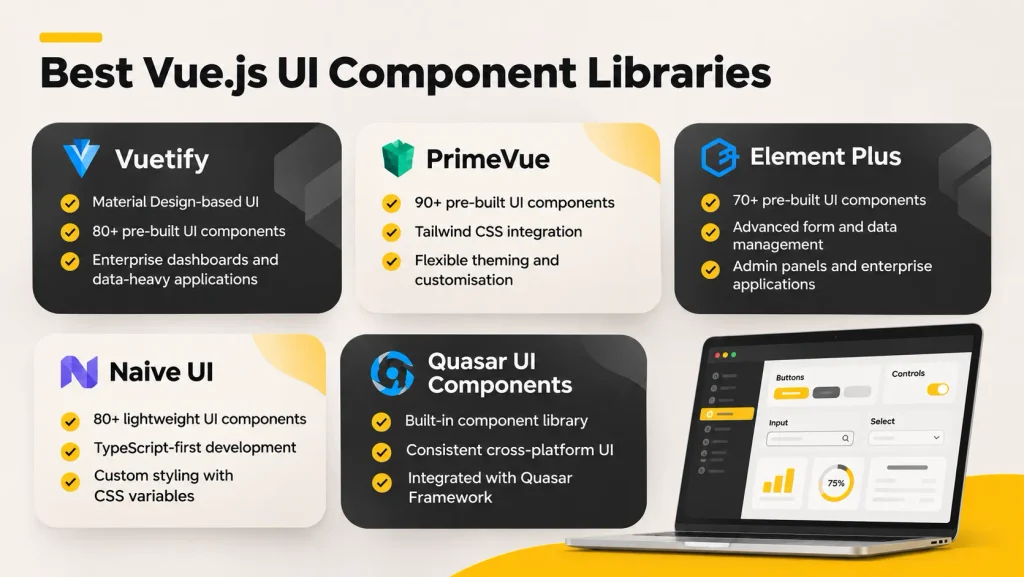
A vue.js ui library provides pre-built, themeable vue.js ui components that teams can drop into their application rather than building common interface elements from scratch. The choice of vue.js component library affects design system consistency, accessibility, bundle size, and the visual language of the application. The right vue.js ui library depends on design requirements, TypeScript adoption, and how much customisation the team needs.
The following sections cover the five most widely used vue.js ui component libraries, with an assessment of each for production use.
Vuetify
Vuetify is the longest-established vue.js ui library in the Vue ecosystem and the default choice for applications that use Material Design. Built on Google’s Material Design specification, Vuetify provides over 80 vue.js ui components covering data tables, forms, navigation, dialogs, tooltips, and layout primitives. Its v3 release (supporting Vue 3 natively) brought improved TypeScript support and a redesigned theming system.
Vuetify is the most popular vue.js component library for enterprise applications in markets outside of East Asia. Its dependability, breadth of vue.js ui components, and large community make it a low-risk choice for teams building data-heavy internal tools and dashboards. The main limitation is that Material Design’s visual constraints make it harder to deliver heavily custom branded UIs without overriding many of Vuetify’s opinionated defaults.
PrimeVue
PrimeVue is a comprehensive vue.js ui library from PrimeTek, the team behind PrimeFaces (a Java/Jakarta EE UI library). It offers over 90 vue.js ui components and, reports approximately 14,000 GitHub stars and around 480,000 weekly npm downloads. PrimeVue’s key differentiator is its design-agnostic approach: components are styled through a theme layer that integrates cleanly with Tailwind CSS.
For teams that want a wide vue.js component library without being locked into Material Design, PrimeVue is the strongest option. Its Tailwind CSS integration makes it practical for teams that use Tailwind as their primary styling approach, and the component breadth covers most enterprise UI needs including advanced data tables, schedulers, charts, and file uploaders. PrimeTek’s commercial backing gives PrimeVue stronger long-term maintenance assurance than purely community-driven vue.js ui libraries.
Element Plus
Element Plus is the Vue 3 successor to Element UI, the dominant vue.js component library in Chinese enterprise development. It provides over 70 vue.js ui components with a clean, neutral design system that works well for data management interfaces, form-heavy applications, and admin panels. The mature date and time pickers, tree views, and calendar components are particularly well-regarded for enterprise data work.
Outside of East Asian markets, Element Plus is a secondary choice compared to Vuetify and PrimeVue, partly due to English-language documentation quality and partly because its design system is optimised for the dense-information UIs common in Chinese enterprise software. For teams building applications with heavy tabular data manipulation, complex forms, or legacy Element UI codebases being migrated to Vue 3, Element Plus is a natural fit.
Naive UI
Naive UI is a TypeScript-first vue.js ui library that prioritises minimal bundle size and clean default styling over design system conformity. With over 80 UI components that are entirely controllable through CSS variables, Naive UI appeals to teams that want a solid vue.js component library without committing to Material Design or a heavyweight styling framework. Its zero-dependency approach (beyond Vue itself) keeps bundle sizes low.
Naive UI is a strong choice for teams building Vue 3 development tools, developer-facing dashboards, or applications where the design team has a custom visual language that existing vue.js ui libraries would work against. Its weaker community and documentation compared to Vuetify or PrimeVue make it a higher-risk choice for large enterprise projects with junior-heavy teams.
Quasar UI components
Quasar includes its own full set of pre-built components as part of the Quasar Framework. These components are not available as a standalone library separate from the Quasar build system, which means teams using Nuxt or Vite plus Vue will need to choose a separate UI library. For teams already committed to the Quasar framework, its built-in components are mature, well-maintained, and cover the full range of interface needs.
Vue.js state management libraries
State management in Vue-based applications has evolved significantly from the Vuex era. The choice between Pinia and Vuex now has a clear default: Pinia for all new Vue.js development. The following sections explain why, and when legacy Vuex code should or should not be migrated.
State management is one of the decisions that most affects the long-term maintainability of web applications, particularly as component trees grow and shared data flows become complex. Teams that underinvest in a clear state management strategy tend to accumulate prop-drilling and event-bus hacks that become expensive to untangle.
Pinia
Pinia is the official state management library for Vue.js, recommended by the Vue core team as the successor to Vuex. With approximately 14,500 GitHub stars and over 2.5 million weekly npm downloads, Pinia has been adopted across virtually all new Vue.js development. Its architecture is simpler than Vuex: stores are defined as composable functions, mutations are eliminated (state is modified directly with actions), and TypeScript inference works without additional type annotation overhead.
For projects starting new Vue-based development today, Pinia is the default. Its integration with Vue DevTools provides the same time-travel debugging capabilities as Vuex. For Vue.js frontend applications using SSR with Nuxt, Pinia’s SSR-safe state serialisation is handled automatically through the @pinia/nuxt module.
Vuex and legacy applications
Vuex remains the state management library in a large installed base of legacy Vue.js applications built before 2022. It is in maintenance mode: security patches and critical bug fixes continue, but new feature development has stopped. Teams maintaining Vuex codebases face a decision: migrate to Pinia incrementally (which the official migration guide supports), or continue with Vuex for the remaining life of the application.
Migration from Vuex to Pinia is not an emergency. Vuex is stable and functional. For Vue teams with limited engineering bandwidth, deferring Vuex migration in favour of product work is a reasonable call. For teams building new features alongside existing Vuex code, Pinia stores can coexist with Vuex in the same application during a gradual migration.
Choosing the right state management approach
Not every Vue.js app needs a global state management library. For small to medium Vue.js applications where state is primarily local to individual vue.js components or small component trees, Vue’s built-in provide/inject and the Composition API’s reactive and ref are sufficient. The rule of thumb: reach for Pinia when state needs to be shared across unrelated branches of the component tree, or when server-fetched data needs to be cached and shared across multiple views.
Vue.js routing, data fetching and utility libraries
Beyond the framework and UI layer, Vue.js development relies on a set of routing, data fetching, and utility libraries that handle the most common application-layer concerns. These libraries integrate cleanly with both Pinia and the composition API, and most are compatible with Nuxt, Quasar, and Vite plus Vue.
Choosing these libraries early matters because they shape how vue.js components access and update data, how navigation state is managed, and how forms handle validation. Swapping them out mid-project is possible but costly.
Vue Router
Vue Router is the official routing library for the Vue.js framework, maintained by the Vue core team. With over 4,600 GitHub stars and approximately 14.9 million monthly downloads, it is the standard for all Vue.js applications where client-side navigation is required. Vue Router 4 (for Vue 3) supports nested routes, dynamic segments, route guards, lazy loading, and transition animations between views.
For Vue 3 development with Nuxt, file-based routing replaces manual Vue Router configuration. For Vite plus Vue or Quasar projects, Vue Router is configured explicitly and provides full control over route structure and navigation behaviour.
TanStack Query for Vue
TanStack Query (formerly React Query) has a Vue adapter that brings its data fetching and caching model to Vue-powered applications. It handles server state separately from UI state: queries are declarative, cached automatically, and updated in the background. For Vue.js development teams that build data-heavy applications with frequent API requests, TanStack Query reduces the boilerplate of loading states, error handling, and cache invalidation that would otherwise be managed manually.
TanStack Query works alongside Pinia rather than replacing it. Pinia manages UI and application state; TanStack Query manages server state. The combination produces cleaner vue.js components that do not mix cache management logic with UI logic.
Axios and API integration
Axios remains the most widely used HTTP client for Vue.js apps, with a simple promise-based API, interceptors for authentication headers, and consistent behaviour across browser and Node environments. For Vue.js apps using Nuxt, the native $fetch utility (built on ofetch) is the preferred option as it handles SSR hydration and server-side API calls more cleanly than Axios in a universal rendering context.
For pure client-side Vue-based applications (Vite plus Vue or Quasar SPA), Axios and the native Fetch API are both appropriate. Teams that need request interceptors, automatic retries, or typed response handling tend to prefer Axios; teams that prefer minimal dependencies default to Fetch.
Form validation libraries
VeeValidate and Vuelidate are the two established form validation VueJS Libraries for the Vue.js ecosystem. VeeValidate uses a schema-based approach (compatible with Zod and Yup) and integrates cleanly with Vue.js components through its Field and Form composition API. Vuelidate takes a model-based approach that works well with Vue’s Options API and simpler form structures. For new Vue-based development, VeeValidate with Zod schema validation offers the most type-safe and composable approach.
Vue.js framework comparison: Nuxt vs Quasar vs Vite + Vue
The three main Vue.js framework options serve different application types, and the right choice is determined by rendering requirements, platform targets, and team familiarity. The comparison below summarises the trade-offs across the dimensions that matter most in production.
| Dimension | Nuxt | Quasar | Vite + Vue |
| Primary use case | Web / SEO | Cross-platform | SPA / lightweight web |
| Rendering modes | SSR, SSG, ISR, SPA | SSR, SSG, SPA, PWA | SPA (CSR only) |
| Mobile output | PWA only | Capacitor / Cordova + PWA | PWA only |
| Desktop output | No | Electron | No |
| Built-in UI | No (choose separately) | Yes (Quasar components) | No (choose separately) |
| Learning curve | Medium | Medium-high | Low |
| Configuration overhead | Low | Medium | Low to medium |
| Community size | Very large | Large | Vast (Vite generic) |
Best for SEO
Nuxt is the clear winner for SEO-critical web applications. Its SSR and SSG modes deliver fully rendered HTML on first load, and its Nuxt Islands architecture reduces client-side JavaScript payload. Quasar supports SSR but its primary audience is application developers rather than content publishers. Vite plus Vue requires additional configuration for server-side rendering and is not recommended for public-facing Vue.js applications where organic search matters.
Best for enterprise apps
Both Nuxt and Quasar serve enterprise contexts well, but through different lenses. Nuxt excels in customer-facing enterprise applications (portals, storefronts, documentation). Quasar excels in internal enterprise tools where multi-platform delivery (web plus mobile plus desktop) is required. Vite plus Vue is best for SPAs within enterprise contexts, such as authenticated admin tools where search engine visibility is irrelevant.
Best for multi-platform apps
Quasar is the only Vue.js framework that natively targets web, mobile, and desktop from a single codebase. For teams that need to maintain these applications across multiple platforms, Quasar reduces the overhead significantly compared to maintaining separate codebases for each target.
Best for SPAs
Vite plus Vue offers the fastest development experience and smallest production bundle for Vue.js applications that do not need server rendering. Nuxt in SPA mode is also viable for teams that want the Nuxt module ecosystem without SSR overhead. For pure SPAs with no SEO requirement, Vite plus Vue is typically the most practical choice.
Best for performance
All three options deliver strong performance with optimised configuration. Vite plus Vue produces the smallest bundles by default for client-rendered Vue-powered applications. Nuxt with Islands hydration provides the best performance for server-rendered production applications because it minimises client-side JavaScript. Quasar’s performance is production-grade but its cross-platform feature set adds some overhead that pure-web options avoid.
Best for developer experience
Vite plus Vue offers the fastest hot module replacement and lowest configuration overhead for building with Vue. Nuxt’s auto-imports and file-based routing eliminate significant boilerplate. Quasar’s CLI is powerful but requires more familiarity before it feels efficient. Teams new to frontend development typically have the fastest initial productivity with either Vite plus Vue or Nuxt.
How to choose the right Vue.js framework or library
Choosing a Vue.js framework is not a one-size-fits-all decision. The correct answer depends on what the application is, who it serves, what performance targets matter, and what the team’s existing skills are. The following questions structure the evaluation systematically.
The goal is to narrow the decision space before comparing features, because feature comparisons between mature Vue.js framework options are often marginal. The meaningful differences are in architectural fit.
Define the application type
Start with what the application actually is. A content website with articles, product pages, and landing pages needs SSR or SSG and therefore needs Nuxt. An internal HR dashboard that employees log into needs a fast SPA and therefore Vite plus Vue. A field service app that must run offline on a mobile device and also on the web needs Quasar. Getting this classification right eliminates most of the ambiguity in the Vue.js framework decision.
Evaluate rendering requirements
Rendering mode is a consequence of the application type, not a separate decision. SSR is for pages that must be indexed by search engines and must load quickly for anonymous users. SSG is for content that changes infrequently and can be pre-rendered at build time. CSR (client-side rendering) is for authenticated experiences where the content is not public. Vue-based applications that mix public and authenticated content typically need hybrid rendering, which Nuxt handles through per-route configuration.
Consider SEO requirements
If organic search is a growth channel, the Vue.js framework choice is effectively made: Nuxt. The vue.js frontend layer must deliver server-rendered or statically generated HTML for search engines to index reliably. Vue.js applications that rely on client-side rendering will struggle to rank regardless of content quality. This is not a future concern; it is a build-day architectural decision. For further reading on how frontend development shapes user experience, the Spark Eighteen blog covers the interaction between rendering strategy and engagement in detail.
Consider mobile or desktop requirements
If the product roadmap includes native or near-native mobile delivery, Quasar is the only Vue.js framework in this list that handles it without a separate codebase. PWA is available in both Nuxt and Quasar, but PWAs have capability gaps (particularly on iOS) compared to Capacitor-wrapped native apps. Teams that know mobile is on the roadmap should build on Quasar from the start rather than migrating later.
Evaluate performance
All three major Vue.js framework options deliver production-grade performance when configured correctly. The differentiated performance questions are: (1) How large is the initial JavaScript bundle? (2) How long does the browser take before the user can interact with the page? (3) How does the application perform on low-end devices and slow connections? Nuxt with Islands hydration gives the best answers on questions 1 and 2 for server-rendered applications. Vite plus Vue gives the best answers on question 1 for client-rendered Vue apps.
Evaluate ecosystem and community
A Vue.js framework with a large, active community is lower risk than one with fragmented maintenance. Nuxt and Vuetify have the deepest module and plugin ecosystems in their respective categories. PrimeVue’s commercial backing from PrimeTek gives it long-term maintenance assurance beyond what community-only VueJS Libraries can guarantee. Stack Overflow answer volume, GitHub issue response times, and release cadence are the most useful proxies for ecosystem health.
Consider long-term maintenance
Vue.js applications are maintained for years, not months. The UI library chosen today will determine upgrade paths, accessibility obligations, and design system consistency three to five years from now. Choosing a library that is actively maintained (clear release notes, security patch policy, community support) matters more than choosing the most feature-complete option that is maintained by a single contributor.
Vue.js frameworks by application type
Different application types demand different things from a Vue.js framework. The selections below represent what engineering teams building production Vue-powered applications should default to, based on rendering requirements, component availability, and ecosystem maturity.
The choices here are starting points, not mandates. Teams with existing expertise in a specific Vue.js framework should factor that into the decision, since team familiarity reduces initial velocity loss significantly.
Best for e-commerce
Nuxt is the standard choice for Vue.js e-commerce development. Product pages, category listings, and landing pages must render server-side for search engine indexing, and Nuxt’s SSR and SSG modes handle this cleanly. Paired with Vuetify or PrimeVue for the component library layer, a Nuxt e-commerce application delivers both SEO performance and a consistent shopping experience.
Best for SaaS applications
Nuxt (for public marketing and documentation) combined with Vite plus Vue (for the authenticated application layer) is the standard pattern for SaaS Vue.js development. The public site needs search engine visibility; the app itself does not. Separating these concerns into two Vue.js framework contexts allows each to be optimised independently.
Best for enterprise applications
Quasar for multi-platform enterprise apps; Nuxt for customer-facing enterprise portals. Enterprise production applications often need both internal tooling (authenticated, complex forms, data-heavy) and customer interfaces (public, indexed, performance-sensitive). The same vue.js frontend approach rarely serves both use cases well.
Best for Dashboards
Vite + Vue with Pinia and either PrimeVue or Vuetify as the UI library is the standard stack for authenticated dashboards. No SSR is needed, so the simplicity of Vite plus Vue reduces overhead. PrimeVue’s data table, chart, and filter components are particularly well-suited to dashboard work. For teams already invested in Material Design, Vuetify’s data grid and card components are reliable.
Best for content websites
Nuxt with static site generation is the standard for content-heavy Vue-based applications: blogs, documentation sites, marketing sites, and media. Nuxt Content (a Nuxt module) adds Markdown and MDX support, making content workflows straightforward without a separate CMS layer.
Best for progressive web apps
Nuxt and Quasar both support PWA output with offline caching and app manifest generation. Quasar’s PWA support is part of its multi-platform CLI and is production-ready out of the box. Nuxt’s PWA support is delivered through the @vite-pwa/nuxt module. For PWA-first web applications, Quasar’s CLI-level integration is marginally more streamlined.
Best for cross-platform applications
Quasar is the only Vue.js framework in this list that covers web, mobile (Capacitor), and desktop (Electron) from a single Vue.js codebase. Teams building products that need to ship to multiple platforms should start with Quasar and avoid the migration cost of rebuilding for multi-platform output later.
Vue.js performance and SEO considerations
Performance and SEO in Vue.js applications are not independent concerns. Rendering mode, JavaScript payload, image strategy, and Core Web Vitals all interact. The choices made at the Vue.js framework level (Nuxt vs Quasar vs Vite plus Vue) set the ceiling for what is achievable in performance, and the choices made at the component and configuration level determine how close the application gets to that ceiling.
The following sections cover the specific performance levers that matter most in Vue 3 development, with attention to what each Vue.js framework enables.
Server-side rendering
SSR (server-side rendering) renders Vue.js applications on the server for each request and sends fully hydrated HTML to the browser. This delivers fast First Contentful Paint (FCP) for new visitors, makes the page indexable by search engines without JavaScript execution, and provides a meaningful experience before client-side Vue.js components hydrate. The cost is server compute on every request and the complexity of ensuring that Vue components behave consistently in both server and browser contexts.
Static site generation
SSG (static site generation) pre-renders Vue-powered applications at build time and serves the output as static files from a CDN. First Contentful Paint is typically faster than SSR (no server compute per request), and infrastructure costs are lower. The limitation is build time: very large production applications with tens of thousands of routes can take significant time to build. Incremental static regeneration, available in Nuxt via route rules, mitigates this by rebuilding individual routes in the background.
Code splitting
Code splitting divides the JavaScript bundle into smaller chunks that are loaded on demand rather than all at once. Vite handles code splitting automatically for Vue.js development via its Rollup-based build. Vue Router’s lazy-loaded routes trigger code splitting per route, ensuring users only download the JavaScript for the views they visit. For large Vue-based applications with many routes and components, effective code splitting can halve initial bundle size.
Lazy loading
Lazy loading applies to both routes and UI pieces. Vue 3’s defineAsyncComponent utility enables component-level lazy loading: heavy frontend components (rich text editors, map components, chart libraries) are not loaded until they appear in the viewport or are navigated to. For web applications with large vue.js ui component library dependencies, component-level lazy loading has the largest bundle size impact.
Core Web Vitals
Google’s Core Web Vitals (Largest Contentful Paint, Cumulative Layout Shift, Interaction to Next Paint) are ranking signals and experience proxies. Applications built with SSR or SSG via Nuxt consistently perform better on LCP than CSR solutions because meaningful content is available before JavaScript loads. CLS is managed through explicit dimensions on images and media elements. INP (Interaction to Next Paint) is managed through efficient event handlers in reusable components and by avoiding synchronous heavy computation in the main thread.
Image and asset optimisation
Nuxt Image (the @nuxt/image module) handles responsive image generation, lazy loading, and format conversion (WebP, AVIF) for Vue.js development with Nuxt. For Vite plus Vue or Quasar, vite-plugin-imagemin and responsive image strategies handle similar optimisation. Images are consistently the largest contributor to LCP in Vue.js applications; optimising image delivery is typically the highest-ROI performance improvement available.
Vue.js security and scalability considerations
Security and scalability are production concerns that the Vue.js framework choice shapes but does not fully determine. The choices made at the library integration, authentication, and deployment configuration level determine whether a Vue.js app remains maintainable and secure as it grows.
As Vue-powered applications scale in team size and complexity, the architecture decisions made around state management, component design, and API integration become increasingly important. Early investment in sensible conventions pays compounding returns.
Authentication
Vue.js applications handle authentication at the application layer, not the framework layer. For Nuxt, nuxt-auth (wrapping next-auth patterns) and Supabase Auth are the most widely used options. For Quasar and Vite plus Vue.js applications, JWT handling with Axios interceptors and Pinia-based session state is the standard approach. Regardless of Vue.js framework, session tokens should never be stored in localStorage in security-sensitive Vue-based applications; use httpOnly cookies via the server instead.
API security
Vue.js frontend applications communicate with APIs that must be secured independently of the Vue.js layer. API keys and secrets must never appear in client-side Vue.js code, including individual components and Pinia stores. For Nuxt applications with server routes, sensitive API calls can be proxied through Nitro server routes, keeping credentials on the server and out of the client bundle.
Dependency management
Vue libraries and third-party dependencies introduce supply-chain security risk. Teams should audit Vue-based development dependencies regularly using npm audit, pin dependency versions in production, and avoid installing packages from unverified sources. For large web applications with many dependencies across the ecosystem, automated dependency update tools (such as Renovate or Dependabot) reduce the manual overhead of keeping packages current.
Application scalability
As Vue.js applications grow, the patterns that worked at ten components become bottlenecks at a thousand. The decisions that most affect scalability are: how components communicate (props down, events up, with Pinia for shared state), whether the codebase uses a consistent file naming and directory convention, and whether vue.js component libraries are integrated through a shared design system layer rather than used ad hoc. Teams building Vue.js applications intended to grow should invest in a component documentation tool (Storybook supports Vue.js) and a Linting configuration early.
Enterprise deployment
Enterprise Vue.js development often requires SAML authentication, audit logging, role-based access control, and integration with identity providers. Nuxt’s server middleware and Nitro server routes make it possible to handle SAML callbacks, audit events, and backend proxy logic within the Nuxt application. For teams deploying Vue.js applications in enterprise environments with strict security requirements, server-rendered Nuxt is typically more practical than a purely client-side Vue.js framework.
Common mistakes when choosing Vue.js frameworks and libraries
Vue.js framework decisions are made early and are expensive to reverse. The following mistakes recur across frontend development projects, and each is avoidable with the right evaluation process.
Understanding where teams go wrong in Vue.js framework selection is as useful as knowing what the right choices are. These patterns are drawn from production Vue projects across a range of application types.
Choosing by popularity alone
The most downloaded component library or the most starred Vue.js framework is not necessarily the right choice for a given project. Vuetify’s popularity reflects its Material Design coverage and enterprise reliability; it is not the right choice for applications that need a neutral or heavily branded visual language. PrimeVue’s flexibility is an advantage in some contexts and a configuration burden in others. Evaluate against your application’s specific requirements, not against a global popularity ranking.
Using too many libraries
Vue 3 development projects frequently accumulate third-party libraries without a clear integration strategy. Having three form validation libraries, two state management approaches, and multiple overlapping components from different sources creates maintenance burden and inconsistent user experience. Set a standard for each category of functionality (one form library, one state management library, one UI toolkit) before the project begins, and enforce it through code review.
Ignoring maintenance
A Vue.js framework or UI library that was actively maintained when the project started may be in decline two years later. Before committing to any component library or utility package, check the last release date, the volume of open GitHub issues, the response time on bug reports, and whether the maintainers have documented a roadmap. Vue packages with single maintainers and no organisational backing are higher risk in long-lived Vue-powered applications than those with commercial or institutional support.
Ignoring application requirements
Choosing a Vue.js framework based on team familiarity alone, without considering the application’s rendering needs, is one of the most expensive mistakes in Vue.js development. Building a public-facing content site on a pure SPA foundation (Vite plus Vue) because the team knows Vite well will cost significantly more to retrofit for SEO later than choosing Nuxt from the start. Rendering mode is not a UI concern; it is an infrastructure decision.
Choosing a library instead of a framework
Teams sometimes reach for a component library or state management library as the foundation of an application when they need a full Vue.js framework. A UI library solves the UI layer; it does not provide routing, rendering, or build tooling. Starting a Vue project with only a component library and no framework creates a gap that the team fills with ad hoc solutions that become technical debt.
Conclusion
The Vue.js ecosystem today offers a mature, complete set of Vue.js frameworks and VueJS Libraries for every application type. Nuxt for SEO-driven web applications, Quasar for cross-platform needs, and Vite plus Vue for lightweight SPAs cover the full spectrum of rendering requirements. At the UI layer, Vuetify, PrimeVue, and Element Plus each serve distinct design and enterprise contexts. Pinia has settled the state management question. Vue Router and VeeValidate handle routing and forms reliably across all Vue.js framework options.
The decisions that matter most are made before the first line of code is written: rendering mode, platform targets, UI library choice, and state management approach. Getting these right compounds positively. Getting them wrong compounds negatively. The guide above provides the framework for making those decisions based on application requirements rather than framework popularity.
For teams that want to understand how framework selection decisions fit into the broader product architecture process, Spark Eighteen’s piece on making critical technical decisions without a co-founder covers the evaluation process in detail. For a comparison of how Vue.js positioning stacks up against other frontend choices your team may be evaluating, the Next.js vs React decision guide offers a parallel framework for assessing architectural fit.
Need help with Vue.js application development?
Spark Eighteen is a product engineering studio that builds and scales Vue.js applications across web, mobile, and enterprise contexts. As an IT service company with deep experience in Vue 3 development, we have shipped Vue.js framework implementations for healthcare data platforms, enterprise SaaS products, and consumer applications.
If your team is evaluating Vue.js frameworks for a new product, migrating a legacy frontend to Vue.js, or scaling an existing Vue.js codebase, we can help you make architecture decisions that hold up across the full product lifecycle.